NokiMo
Furkan Gözükara
Furkan Gözükara

patreon


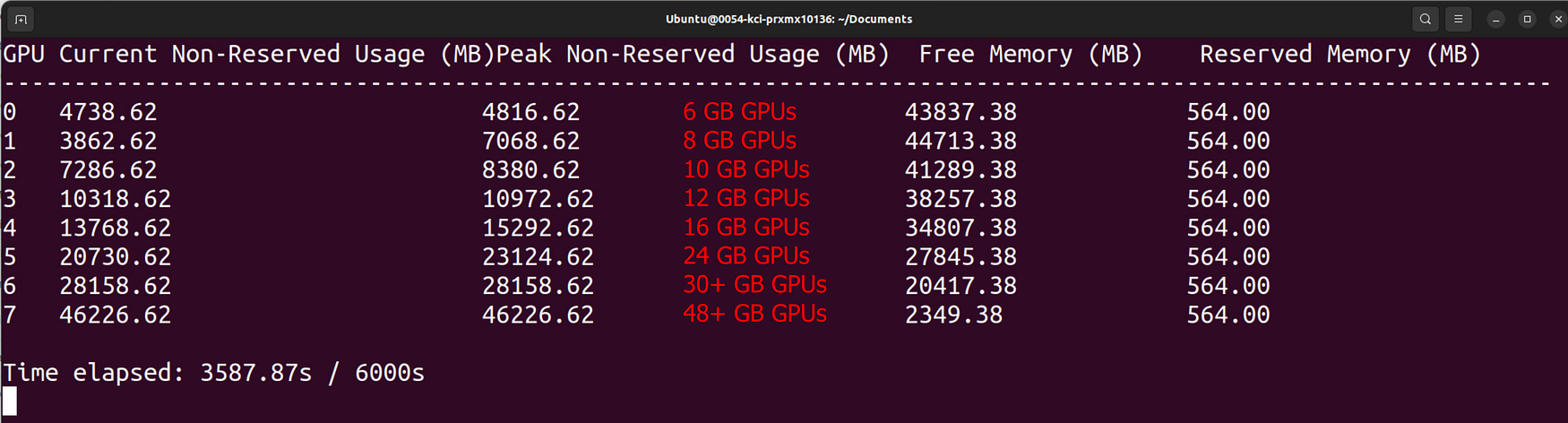
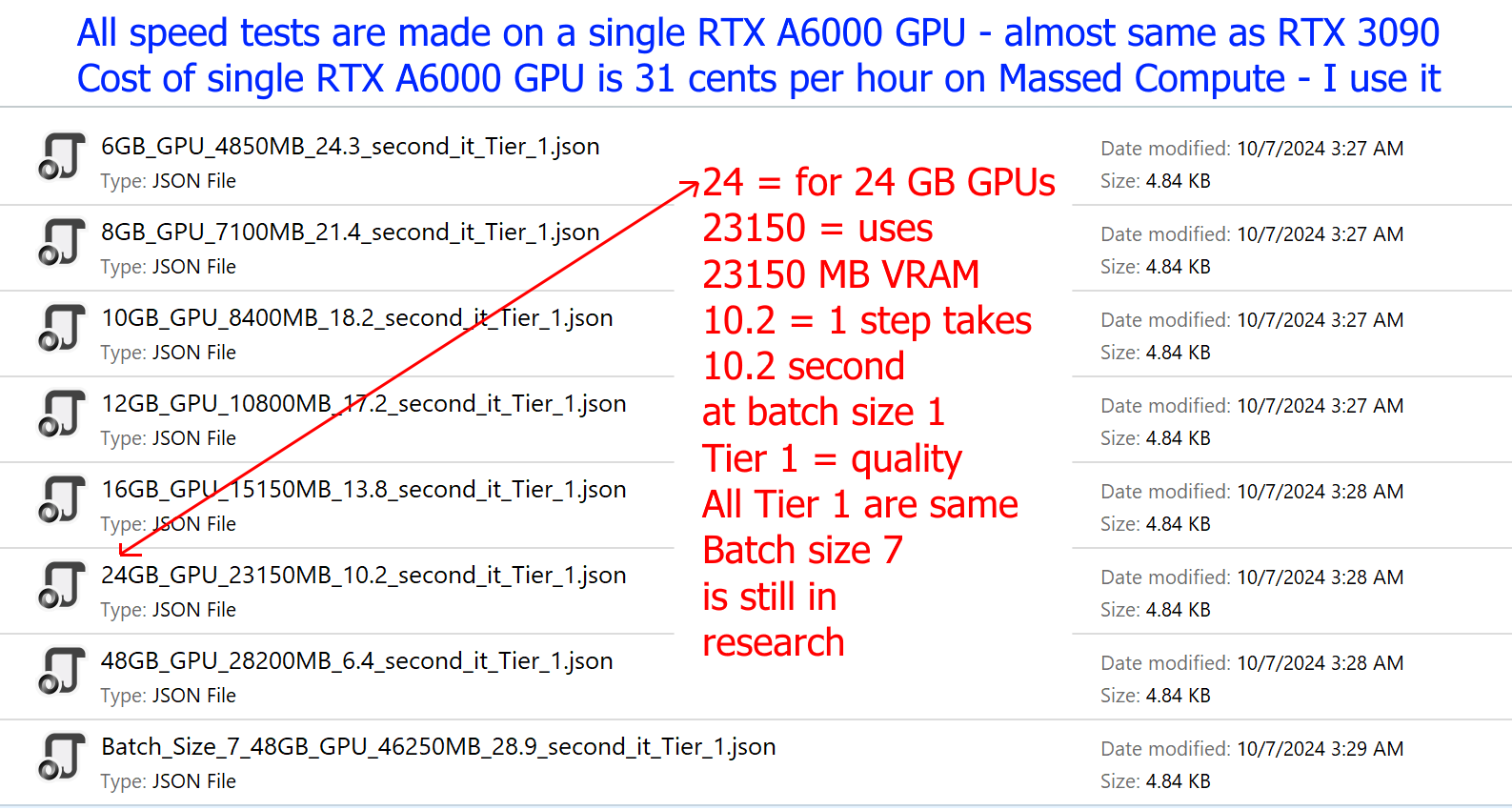
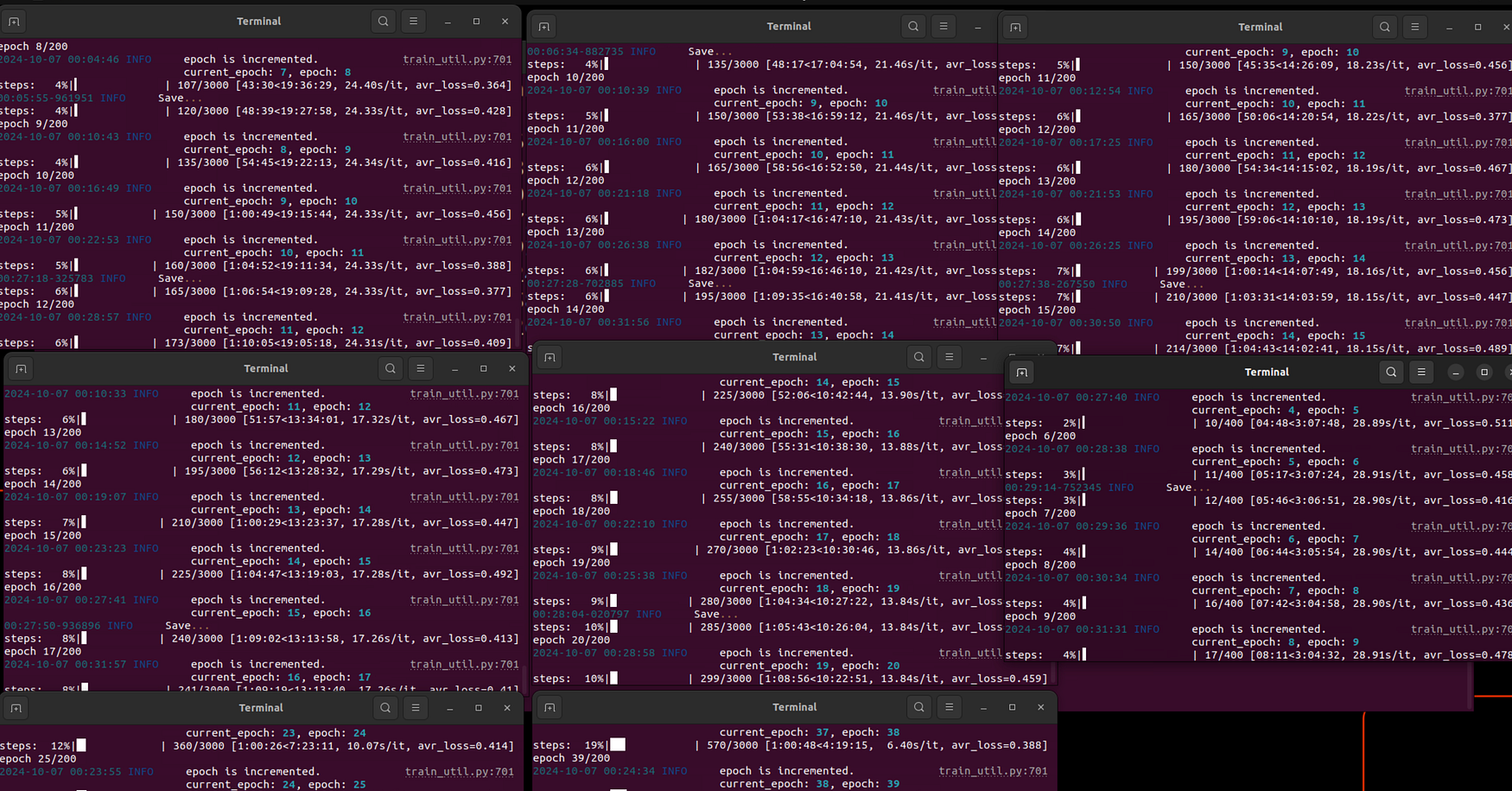
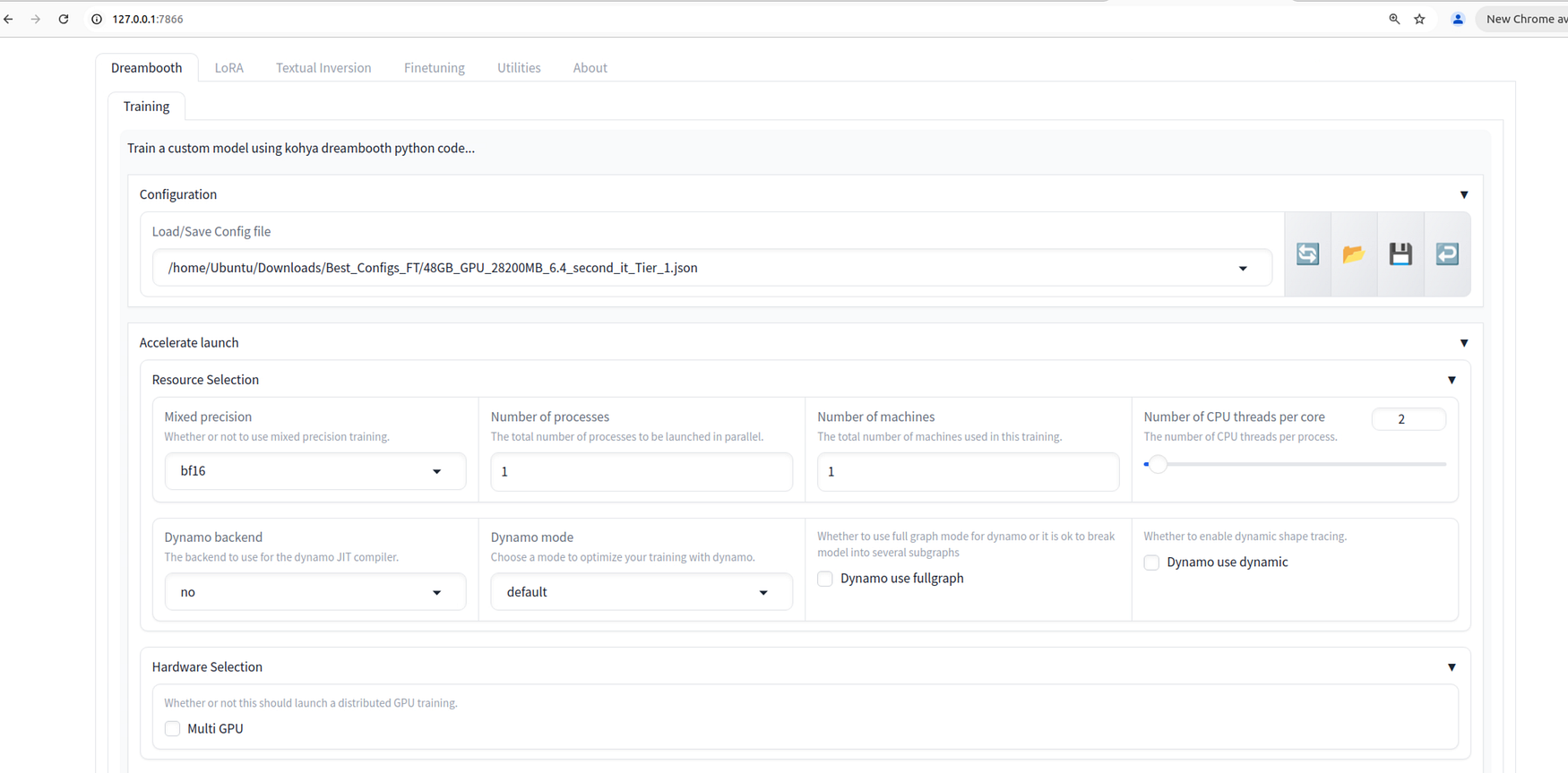
Huge news for Kohya GUI - Now you can fully Fine Tune / DreamBooth FLUX Dev with as low as 6 GB GPUs without any quality loss compared to 48 GB GPUs - Moreover, Fine Tuning yields better results than any LoRA training could

Huge news for Kohya GUI - Now you can fully Fine Tune / DreamBooth FLUX Dev with as low as 6 GB GPUs without any quality loss compared to 48 GB GPUs - Moreover, Fine Tuning yields better results than any LoRA training could

Config Files

Tutorials

LoRA Extraction

Info

Installers

Huge news for Kohya GUI - Now you can fully Fine Tune / DreamBooth FLUX Dev with as low as 6 GB GPUs without any quality loss compared to 48 GB GPUs - Moreover, Fine Tuning yields better results than any LoRA training could Huge news for Kohya GUI - Now you can fully Fine Tune / DreamBooth FLUX Dev with as low as 6 GB GPUs without any quality loss compared to 48 GB GPUs - Moreover, Fine Tuning yields better results than any LoRA training could Huge news for Kohya GUI - Now you can fully Fine Tune / DreamBooth FLUX Dev with as low as 6 GB GPUs without any quality loss compared to 48 GB GPUs - Moreover, Fine Tuning yields better results than any LoRA training could Huge news for Kohya GUI - Now you can fully Fine Tune / DreamBooth FLUX Dev with as low as 6 GB GPUs without any quality loss compared to 48 GB GPUs - Moreover, Fine Tuning yields better results than any LoRA training could Huge news for Kohya GUI - Now you can fully Fine Tune / DreamBooth FLUX Dev with as low as 6 GB GPUs without any quality loss compared to 48 GB GPUs - Moreover, Fine Tuning yields better results than any LoRA training could Huge news for Kohya GUI - Now you can fully Fine Tune / DreamBooth FLUX Dev with as low as 6 GB GPUs without any quality loss compared to 48 GB GPUs - Moreover, Fine Tuning yields better results than any LoRA training could Huge news for Kohya GUI - Now you can fully Fine Tune / DreamBooth FLUX Dev with as low as 6 GB GPUs without any quality loss compared to 48 GB GPUs - Moreover, Fine Tuning yields better results than any LoRA training could Huge news for Kohya GUI - Now you can fully Fine Tune / DreamBooth FLUX Dev with as low as 6 GB GPUs without any quality loss compared to 48 GB GPUs - Moreover, Fine Tuning yields better results than any LoRA training could Huge news for Kohya GUI - Now you can fully Fine Tune / DreamBooth FLUX Dev with as low as 6 GB GPUs without any quality loss compared to 48 GB GPUs - Moreover, Fine Tuning yields better results than any LoRA training could Huge news for Kohya GUI - Now you can fully Fine Tune / DreamBooth FLUX Dev with as low as 6 GB GPUs without any quality loss compared to 48 GB GPUs - Moreover, Fine Tuning yields better results than any LoRA training could Huge news for Kohya GUI - Now you can fully Fine Tune / DreamBooth FLUX Dev with as low as 6 GB GPUs without any quality loss compared to 48 GB GPUs - Moreover, Fine Tuning yields better results than any LoRA training could Huge news for Kohya GUI - Now you can fully Fine Tune / DreamBooth FLUX Dev with as low as 6 GB GPUs without any quality loss compared to 48 GB GPUs - Moreover, Fine Tuning yields better results than any LoRA training could Huge news for Kohya GUI - Now you can fully Fine Tune / DreamBooth FLUX Dev with as low as 6 GB GPUs without any quality loss compared to 48 GB GPUs - Moreover, Fine Tuning yields better results than any LoRA training could Huge news for Kohya GUI - Now you can fully Fine Tune / DreamBooth FLUX Dev with as low as 6 GB GPUs without any quality loss compared to 48 GB GPUs - Moreover, Fine Tuning yields better results than any LoRA training could Huge news for Kohya GUI - Now you can fully Fine Tune / DreamBooth FLUX Dev with as low as 6 GB GPUs without any quality loss compared to 48 GB GPUs - Moreover, Fine Tuning yields better results than any LoRA training could Huge news for Kohya GUI - Now you can fully Fine Tune / DreamBooth FLUX Dev with as low as 6 GB GPUs without any quality loss compared to 48 GB GPUs - Moreover, Fine Tuning yields better results than any LoRA training could Huge news for Kohya GUI - Now you can fully Fine Tune / DreamBooth FLUX Dev with as low as 6 GB GPUs without any quality loss compared to 48 GB GPUs - Moreover, Fine Tuning yields better results than any LoRA training could Huge news for Kohya GUI - Now you can fully Fine Tune / DreamBooth FLUX Dev with as low as 6 GB GPUs without any quality loss compared to 48 GB GPUs - Moreover, Fine Tuning yields better results than any LoRA training could Huge news for Kohya GUI - Now you can fully Fine Tune / DreamBooth FLUX Dev with as low as 6 GB GPUs without any quality loss compared to 48 GB GPUs - Moreover, Fine Tuning yields better results than any LoRA training could Huge news for Kohya GUI - Now you can fully Fine Tune / DreamBooth FLUX Dev with as low as 6 GB GPUs without any quality loss compared to 48 GB GPUs - Moreover, Fine Tuning yields better results than any LoRA training could Huge news for Kohya GUI - Now you can fully Fine Tune / DreamBooth FLUX Dev with as low as 6 GB GPUs without any quality loss compared to 48 GB GPUs - Moreover, Fine Tuning yields better results than any LoRA training could Huge news for Kohya GUI - Now you can fully Fine Tune / DreamBooth FLUX Dev with as low as 6 GB GPUs without any quality loss compared to 48 GB GPUs - Moreover, Fine Tuning yields better results than any LoRA training could Huge news for Kohya GUI - Now you can fully Fine Tune / DreamBooth FLUX Dev with as low as 6 GB GPUs without any quality loss compared to 48 GB GPUs - Moreover, Fine Tuning yields better results than any LoRA training could Huge news for Kohya GUI - Now you can fully Fine Tune / DreamBooth FLUX Dev with as low as 6 GB GPUs without any quality loss compared to 48 GB GPUs - Moreover, Fine Tuning yields better results than any LoRA training could Huge news for Kohya GUI - Now you can fully Fine Tune / DreamBooth FLUX Dev with as low as 6 GB GPUs without any quality loss compared to 48 GB GPUs - Moreover, Fine Tuning yields better results than any LoRA training could Huge news for Kohya GUI - Now you can fully Fine Tune / DreamBooth FLUX Dev with as low as 6 GB GPUs without any quality loss compared to 48 GB GPUs - Moreover, Fine Tuning yields better results than any LoRA training could Huge news for Kohya GUI - Now you can fully Fine Tune / DreamBooth FLUX Dev with as low as 6 GB GPUs without any quality loss compared to 48 GB GPUs - Moreover, Fine Tuning yields better results than any LoRA training could Huge news for Kohya GUI - Now you can fully Fine Tune / DreamBooth FLUX Dev with as low as 6 GB GPUs without any quality loss compared to 48 GB GPUs - Moreover, Fine Tuning yields better results than any LoRA training could

Comments

I think I discovered by problem, I believe. Same config, but using 25 base training images vs the count I had tried previously which was over 160 but under 200 images, I don't recall. I will have to dial this in but clearly the config I was using had too many images. Could that have been the cause? Now I am actively getting 6.99s/it, avr_loss=0.396] at the moment.

Pew

Thank you! I discovered by problem, I believe. Same config, but using 25 base training images vs the count I had tried previously which was over 160 but under 200 images, I don't recall. I will have to dial this in but clearly the config I was using had too many images I think.

Pew

yes first train with 1024x1024. after that you can enable bucket and compare. but i really suggest all images to be 1024x1024

Furkan Gözükara

That was it. With 64GB of ram, I don't have any more problems. https://i.imgur.com/xNO7epE.png I have a question in passing: why do my 22 images turn into 58 examples? Is it because they're not squares? I want to train some portraits of an old CRPG, but as well as being taller than they are wide, some of them are of rather low quality (582px*900px). Is this a problem? Thanks

Leilu Dallas

hi impossible to know without more details. but there was a user just reported 6 second / it yesterday for fine tuning on RTX 4090 , if you make a video of every step i can tell. or upgrade gold member i can connect your pc and check out

Furkan Gözükara

I am also having this issue; rtx4090; starting from last week.

N V

Nah everything's great, efficiency went up 100% ;-)

Bartosz Polecki

you are welcome. working nice right? any issues?

Furkan Gözükara

hi. either you can make a video of how you are trying so i can see your error , or upgrade to gold member and i can connect your pc and hopefully fix. rtx 4090 owners getting like 6 second / it - our other followers tested and reported this speed

Furkan Gözükara

Hi I followed instructions, I have 4090, 32gb ram, and when I run 24,16,or 12 gb config my completion time is always around 22000.00.00 hours , I do have accurate Cuda , git and python installed. I did run flux fix and also manually answered questions for choice 5 of install.

J.ruthless

Ok,thanks for the "button" Mate its good enough. Regards !

Bartosz Polecki

awesome let me know

Furkan Gözükara

I can tell after delivery.

Leilu Dallas

awesome what are the results?

Furkan Gözükara

if you need lora yes. but i prefer fine tuned model even better

Furkan Gözükara

Strategy: always finetune a checkpoint and then derive a smart lora from checkpoint ?

Bolli Hotshots

hi it needs 23500 MB VRAM. that is why. use rank 4 it will be way faster. actually i suggest to do fine tuning instead of LoRA it is like 6 -7 second / it on RTX 4090 and way better quality : https://www.patreon.com/posts/112099700

Furkan Gözükara

Hi, I tried now Rank_3_T5_XXL_23500MB_11_35_Second_IT on my 4090 on latest kohya_ss etc. Trains lora very slow and feeled endless. Currently with 13,90s / it...I think to cancel the training of ca. 180 picture. Any tip for improvement ?

Bolli Hotshots

I just bought a 64gb kit

Leilu Dallas

that is really good, way better than A6000 on linux :)

Furkan Gözükara

yes looks like for 12 GB GPUs, you need at least 48 GB RAM memory. can you upgrade your PC RAM amount?

Furkan Gözükara

Yo, I can't make it to work on my 4070 12GB and 32GB ram : OOM error. I tested 12GB_GPU_10800MB_17.2_second_it_Tier_1.json, Rank_6_10500MB_10_63_Second_IT.json and Rank_5_11700MB_12_40_Second_IT.json

Leilu Dallas

I get 6.7s/it on RTX 4090

Robert Arsene

10 second / it is great and expected timing

Furkan Gözükara

did you install torch 2.5 and started with our starter so it didnt return older torch?

Furkan Gözükara

L40S is a beast

Furkan Gözükara

yes 21.15 second is not expected. it should be way faster for rtx 4090.

Furkan Gözükara

Update: Hours later and the RTX 4090 continues to slow down, yet I'm not using the computer for anything else. I suspect there remains an issue with my setup. steps: 77%|████▉ | 2329/3040 [13:41:02<4:10:38, 21.15s/it, avr_loss=0.421]

Pew

It worked, thank you! Trained my first model. As you said: Much better quality than a LORA. About 10s/it on my 3090, so it does take a long time. BTW, love your prompts in the series you posted here!

Jeroen Van Harten

I spun up a Runpod instance, using "1 x L40S 32 vCPU 125 GB RAM," and the same dataset and while the json is different (24GB vs 48GB), I used the same hyper-parameters I had on the RTX 4090 and now this training in progress with the 48 GB GPU is showing steps: 1%|▌ | 22/3040 [01:48<4:08:05, 4.93s/it, avr_loss=0.395

Pew

I'm using the base 24GB_GPU_23150MB_10.2_second_it_Tier_1.json At the moment, it shows; steps: 26%|███▊ | 802/3040 [3:22:32<9:25:12, 15.15s/it, avr_loss=0.418] Can you please look over my json as configured for this training in session? https://codeshare.io/r4rvRz I've also posted the cmd.exe output which has some errors, can you look this over? https://codeshare.io/dejYRR I don't quite understand - and in all, it seems slower than anticipated, and right now, the training has been running for 4hrs 5min, and Task Manager is showing: GPU Utilization: Bouncing dramatically, and randomly between, 29%, 99%,100%,88%,76%,53%,and so on, as this is new to me and I've not seen that kind of activity before. Dedicated GPU Memory: Also shows active fluctuation from 21.0 GB to 23.3 GB of GPU VRAM / 24.0 GB. Shared GPU Memory: Rather consistent, at 8.8 / 63.9 GB GPU Memory: Shows 32.1 / 87.9 GB with minimal fluctuation. The Windows 11 machine itself has 128 GB System memory installed with Intel(R) Core(TM) i9-14900KF 3.20 GHz processor. /it increased by one second in under 225 steps: steps: 34%|██▍ | 1025/3040 [4:44:13<9:18:44, 16.64s/it, avr_loss=0.419] I welcome your insight and feedback, please and thank you!

Pew

As a base model select your last checkpoint, it will be same as continuing from that point

Furkan Gözükara

it is how block swap designed. it moves blocks between RAM and GPU. RTX 4090 should get like 5 second / it what is your speed?

Furkan Gözükara

Doc, absent explicit detail, do you know what might be causing my RTX 4090 to spill over to system ram at high levels? I tried 24GB_GPU_23150MB_10.2_second_it_Tier_1.json, though after coming across the issue, I also tried the 16GB .json and in that test, it wouldn't use all of the available VRAM and instead used system memory 3x the VRAM it was using. I was trying to run 80 epochs, 1 base image repeat for 38 training images which lead to around 3,040 steps or so - nothing too taxing I thought. I have 128 GB System Ram.

Pew

it flies 100MB/s on massed compute, so no big deal, everything ready in few minutes

Jan Zhor

How do you resume training Dreambooth Flux after the training crashes?

Basrad Wong

well this is what free open source is you need to figure out :) they dont care too much

Furkan Gözükara

I will look for your startup bat, thanks! And on the python version: There are 2 installers in the official kohya directory. A standard one, that just takes the default python to setup the venv (in my case 3.12), but there's also an installer that specifically uses 3.10. Not sure why bmaltais didn't make that 3.10 installer the default one, because it won't run on 3.12.

Jeroen Van Harten

well normally i make python 3.10 to be used but in this case we are using official installer of bmaltais kohya so he needs to make it. you need to use python 3.10 , so make it default while installing . yes use my bat file to start it will skip that return back

Furkan Gözükara

Hi, I just tried the latest install (v40). 2 things: I have python 3.12 installed so I need to stop the setup.bat from running to force a 3.10 install. Maybe that's something you can incorporate in your install script? After I install torch 2.5 and do gui.bat it says that the wrong torch is installed and reverts back to 2.4. Any ideas on that?

Jeroen Van Harten

thanks a lot

Furkan Gözükara

thanks working on a detailed tutorial as well

Furkan Gözükara

Dude absolutely amazing results look incredible. Looking forward to trying

Brent Young

This is awesome

Steve

i think 1024 works best but you can train 1280 or 1536px. lower reduces quality but higher i didn't see much improvements but can be tested and compared, i may test later

Furkan Gözükara

Would the dreambooth & loras also train at higher resolution than 1024x1024 for flux, now that the GPU requirements are less? Or will it only work properly/at high quality up to 1024x1024? Or would it slow down too much if done higher?

cool1

i can add a downloader button to template though that is a good idea will do

Furkan Gözükara

hello. sadly I can't because template already big :D but we have downloader just run it and it is really fast

Furkan Gözükara

Hi Mate, i have unrelated question, can you update the template for massed compute A6000 to include flux model, VAE and t5 already downloaded ? I tend to generate stuff remotely during pause in the work but because i have to download models every time i deploy new gpu everything for flux have to be downloaded all over again and it takes my pause away ;-) Regards

Bartosz Polecki

I have a comprehensive style training : https://huggingface.co/MonsterMMORPG/3D-Cartoon-Style-FLUX just use dreambooth config instead of lora exactly same

Furkan Gözükara

Could you create a comprehensive tutorial on how to make a style using Dreambooth?

Lukas


Related Creators