I have done total 104 different LoRA trainings and compared each one of them to find the very best hyper parameters and the workflow for FLUX LoRA training by using Kohya GUI training script.
You can see all the done experiments’ checkpoint names and their repo links in following public post: https://www.patreon.com/posts/110838414
After completing all these FLUX LoRA trainings by using the most VRAM optimal and performant optimizer Adafactor I came up with all of the following ranked ready to use configurations.
You can download all the configurations, all research data, installers and instructions at the following link : https://www.patreon.com/posts/110879657
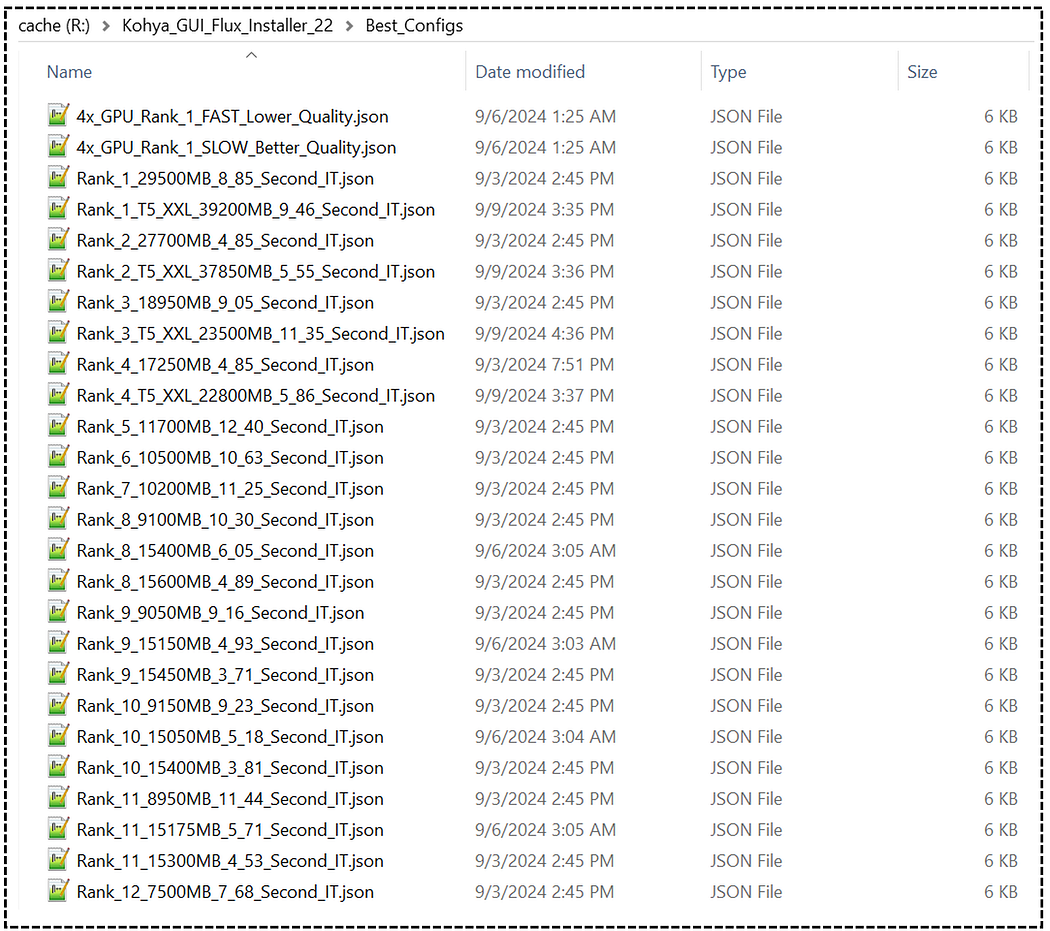
https://www.patreon.com/posts/110879657
I also have prepared 2 full tutorials. First tutorial covers how to train and use the best FLUX LoRA locally on your Windows computer : https://youtu.be/nySGu12Y05k
This is the main tutorial that you have to watch without skipping to learn everything. It has total 74 chapters, manually written English captions. It is a perfect resource to become 0 to hero for FLUX LoRA training.
FLUX LoRA Training Simplified: From Zero to Hero with Kohya SS GUI (8GB GPU, Windows) Tutorial Guide
The second tutorial I have prepared is for how to train FLUX LoRA on cloud. This tutorial is super extremely important for several reasons. If you don’t have a powerful GPU, you can rent a very powerful and very cheap GPU on Massed Compute and RunPod. I prefer Massed Compute since it is faster and cheaper with our special coupon SECourses. Another reason is that in this tutorial video, I have fully in details shown how to train on a multiple GPU setup to scale your training speed. Moreover, I have shown how to upload your checkpoints and files ultra fast to Hugging Face for saving and transferring for free. Still watch first above Windows tutorial to be able to follow below cloud tutorial : https://youtu.be/-uhL2nW7Ddw
Blazing Fast & Ultra Cheap FLUX LoRA Training on Massed Compute & RunPod Tutorial — No GPU Required!
These above images are generated on SwarmUI with the above shared configs trained LoRA on my poor 15 images dataset. Everything shown in tutorial videos for you to follow. Then I have used SUPIR the very best upscaler to 2x upscale them with default parameters except enabling face enhancement : https://youtu.be/OYxVEvDf284
Complete Guide to SUPIR Enhancing and Upscaling Images Like in Sci-Fi Movies on Your PC
All the prompts used to generate below images shared in the below public link:
https://gist.github.com/FurkanGozukara/3e834b77a9d8d6552f46d36bc10fe92a
In the rapidly evolving landscape of artificial intelligence, a new frontier has emerged with the introduction of FLUX, a state-of-the-art text-to-image generative AI model. An expert in the field has recently shared a comprehensive guide on training LoRA (Low-Rank Adaptation) on this groundbreaking model, offering insights that could revolutionize the way we approach AI image generation.
The expert, who has conducted an impressive 72 full training sessions over the past week, has developed a range of unique training configurations tailored for GPUs with varying VRAM capacities, from as little as 8GB to a whopping 48GB. These configurations have been meticulously optimized for VRAM usage and ranked by training quality, with all of them reportedly delivering outstanding results. The primary difference between these configurations lies in the training speed, making it possible for users with even modest 8GB RTX GPUs to train impressive FLUX LoRA models at a respectable pace.
The tutorial presented by the expert utilizes Kohya GUI, a user-friendly interface built on the acclaimed Kohya training scripts. This graphical user interface simplifies the process, allowing users to install, set up, and initiate training with just a few mouse clicks. While the demonstration is conducted on a local Windows machine, the process is identical for cloud-based services, making this tutorial valuable for users across different platforms.
One of the key advantages of this tutorial is its comprehensive nature. It covers everything from basic concepts to expert settings, making it accessible for complete beginners while still offering valuable insights for experienced users. The expert promises to guide viewers through the entire process, from training to utilizing the generated LoRA models within the Swarm UI, and even demonstrates how to perform grid generation to identify the best training checkpoint.
Interestingly, the tutorial doesn't stop at FLUX. The expert also showcases how to train Stable Diffusion 1.5 and SDXL models using the latest Kohya GUI interface, broadening the scope of the guide and its potential applications.
To support the tutorial, the expert has prepared an extensive written post containing all necessary instructions, links, and guides. This post, which will be regularly updated with new information, hyperparameters, and features, serves as the ultimate companion guide for viewers following the tutorial.
The expert emphasizes the importance of the dataset quality in training. They advise using a diverse set of images with different poses, expressions, clothing, and backgrounds to achieve better results. The tutorial also touches on the significance of image focus, sharpness, and lighting in the training dataset.
A noteworthy aspect of the tutorial is its focus on optimizing VRAM usage. The expert provides tips on reducing VRAM consumption, such as disabling startup programs and using tools like nvitop to monitor VRAM usage accurately. This attention to resource management is crucial for users working with limited hardware capabilities.
The guide also delves into the intricacies of using regularization images in training, particularly for Stable Diffusion 1.5 and SDXL models. The expert shares a dataset of 5,200 high-quality regularization images for both men and women, demonstrating how to incorporate these into the training process effectively.
An interesting point raised in the tutorial is the potential superiority of full fine-tuning over LoRA training for certain models. The expert suggests that for SDXL and SD1.5, doing DreamBooth fine-tuning and then extracting LoRA might yield better results than direct LoRA training.
The tutorial doesn't shy away from addressing current limitations and ongoing developments. For instance, the expert mentions that they are still researching the impact of training the text encoder clip large, which slightly increases VRAM usage and slows down the process. They promise to update the configurations once their research is complete.
A significant portion of the guide is dedicated to explaining how to find the best checkpoint after training. The expert demonstrates the use of grid generation tools to compare different checkpoints efficiently, allowing users to identify the most effective LoRA for their specific needs.
The tutorial also touches on the differences between training on Windows and Linux systems. Currently, Windows training is slower, but the expert hints at potential improvements with the upcoming release of Torch 2.4.1, which could significantly boost Windows training speed without compromising quality.
To support the community around this technology, the expert has created various resources. These include a Discord channel with over 8,000 members, a Patreon page with exclusive content and script updates, a GitHub repository with over 2,000 stars, and a subreddit for discussions and announcements. The expert's commitment to engaging with the community and providing regular updates underscores the dynamic nature of this field.
In conclusion, this comprehensive tutorial on training LoRA on the FLUX model represents a significant step forward in democratizing access to cutting-edge AI technology. By providing detailed, step-by-step instructions and addressing various hardware configurations, the expert is empowering a wide range of users to experiment with and benefit from the latest advancements in text-to-image AI models. As the field continues to evolve rapidly, resources like this tutorial will play a crucial role in fostering innovation and pushing the boundaries of what's possible in AI-generated imagery.
This article has explored the key points of the tutorial, highlighting its comprehensive nature, the expert's extensive research, and the potential impact of these techniques on the field of AI image generation. As we look to the future, it's clear that the democratization of these powerful tools will continue to drive innovation and creativity in ways we're only beginning to imagine.
In the ever-evolving landscape of artificial intelligence, a groundbreaking tutorial has emerged, promising to revolutionize the way we approach AI image generation. This comprehensive guide, spanning over an hour, offers an in-depth look at training FLUX models and utilizing cloud services for those without access to powerful GPUs or those seeking to accelerate their training process.
The tutorial, presented by an unnamed expert in the field, begins with an introduction to FLUX training on cloud services, specifically focusing on Massed Compute and RunPod platforms. The presenter emphasizes the cost-effectiveness of these solutions, stating that users can train "amazing FLUX models in under 1 hour by only using $1.25 per hour by using 4x GPU." This pricing model makes high-end AI image generation accessible to a broader audience, democratizing a technology that was once limited to those with expensive hardware.
One of the key features highlighted in the tutorial is the flexibility in GPU usage. While the presenter demonstrates the process using 4x GPU, they clarify that it's not mandatory, and users can opt for a single GPU setup as well. This flexibility allows users to scale their resources based on their specific needs and budget constraints.
The tutorial doesn't just stop at training models; it goes a step further by demonstrating how to use SwarmUI in both RunPod and Massed Compute environments. SwarmUI, as explained in the video, allows users to generate images rapidly, perform grid generation, and compare checkpoints efficiently. This feature is particularly useful for researchers and artists who need to iterate quickly through various models and settings.
Interestingly, the presenter also introduces the Forge Web UI, providing users with an alternative interface for utilizing their generated LoRA checkpoints. This multi-platform approach ensures that users have options and can choose the interface that best suits their workflow.
One of the most impressive aspects of the tutorial is the speed at which large files can be uploaded and downloaded. The presenter demonstrates uploading 12GB LoRA files to Hugging Face in just 2 minutes, a feat that significantly streamlines the workflow for AI enthusiasts and professionals alike.
The tutorial is structured to be accessible to both beginners and advanced users. For those new to FLUX training, the presenter strongly recommends watching their main FLUX LoRA training Windows tutorial first, as it covers all the fundamental details. This structured approach ensures that viewers have a solid foundation before diving into the more advanced cloud-based techniques.
Throughout the video, the presenter emphasizes the importance of detailed documentation. They mention having prepared a comprehensive post with instructions containing all necessary information and links. This attention to detail reflects a commitment to thorough education and support for the AI community.
The tutorial is divided into two main sections: one focusing on Massed Compute and the other on RunPod. This structure allows viewers to choose the platform that best suits their needs or explore both for a comprehensive understanding of cloud-based AI training options.
In the Massed Compute section, the presenter walks through the entire process, from setting up an account to running the first training session. They provide step-by-step instructions on how to connect to the remote machine using ThinLinc client, emphasizing important details such as setting up local device synchronization for file transfers.
One of the key advantages of Massed Compute highlighted in the tutorial is its superior speed compared to RunPod, especially in terms of file transfer and model loading. The presenter demonstrates how to upgrade Kohya (a popular AI tool) to the latest version and switch to the accurate branch for FLUX training.
The tutorial also covers the intricacies of dataset preparation, configuration settings, and the nuances of single GPU versus multi-GPU training. The presenter explains how to adjust learning rates and epochs when scaling up to multiple GPUs, providing valuable insights into the mathematics behind these adjustments.
A significant portion of the tutorial is dedicated to demonstrating the use of SwarmUI for image generation and checkpoint comparison. The presenter shows how to set up multiple backends for efficient use of multiple GPUs, a feature that significantly speeds up the workflow.
One of the most valuable aspects of the tutorial is the section on uploading and downloading models to and from Hugging Face. The presenter introduces a custom Jupyter notebook that allows for incredibly fast uploads and downloads, a tool that could be a game-changer for many in the AI community.
Moving on to the RunPod section, the presenter provides a similar walkthrough but highlights the differences between the two platforms. They note that while RunPod offers permanent storage, which is an advantage over Massed Compute, it tends to have slower hard drives and download speeds.
The tutorial doesn't shy away from showing real-time troubleshooting. When encountering issues with installations or file transfers, the presenter walks through the problem-solving process, providing viewers with valuable insights into handling common pitfalls.
Throughout the tutorial, the presenter consistently emphasizes the importance of understanding file paths and system configurations. This attention to detail ensures that viewers not only learn how to use these tools but also gain a deeper understanding of the underlying systems.
The tutorial concludes with a demonstration of using Forge Web UI on RunPod, offering yet another option for users to interact with their trained models. The presenter notes some disadvantages of Forge Web UI compared to SwarmUI, particularly in terms of VRAM usage during LoRA patching.
Looking to the future, the presenter hints at ongoing research into fine-tuning FLUX and optimizing training parameters for the CLIP large model. This forward-looking approach suggests that the field of AI image generation is far from static and that viewers can expect even more powerful and efficient techniques in the near future.
In conclusion, this comprehensive tutorial represents a significant step forward in making advanced AI image generation techniques accessible to a wider audience. By leveraging cloud services and providing detailed instructions on complex processes, the presenter has opened up new possibilities for artists, researchers, and AI enthusiasts alike. As the field continues to evolve, tutorials like this will play a crucial role in democratizing AI technology and pushing the boundaries of what's possible in image generation.
Furkan Gözükara
2024-09-12 00:54:05 +0000 UTCFedor
2024-09-11 15:32:10 +0000 UTCFurkan Gözükara
2024-09-10 02:15:24 +0000 UTCshen oracle
2024-09-10 02:01:04 +0000 UTCFurkan Gözükara
2024-09-10 00:45:01 +0000 UTCSteve
2024-09-10 00:17:22 +0000 UTC