
Translator++ v 1.6.30 - TPP file & Baidu
Added 2019-06-30 13:49:00 +0000 UTCHello fellow translators,
This month release of Translator++ is a major one.
Version 1.6.30
- Added capability to import/export to .tpp (Translator++ Project Package) file. We can continue our work to another PC now.
- BING translation engine is updated. Now can translate into and translate from any language.
- BING translation engine is updated. Now can modify url API.
- Bug fix on Google Cloud Translator, custom url doesn't work when changing URL on options
- Some fix on auto translator feature.
- Fix on Atlas translator that somehow missing the required middleware binary file to interact with Atlas’ dll.
We finally can transfer our project to other PC by using TPP file.
TPP file will pack your “trans” file, along with all necessary game file needed to build a working game patch. So when you import your project in another PC by using TPP file, you can compile a game patch from that PC too. You don’t required to start a new project, and the original full game data is also not required.

You can find the menu from Export file.
I think the TPP file conclude all the “must have” feature in my to-do list. Now I can focus on the “nice to have” feature.
Baidu Translate
I have fiddle around baidu translation a bit, and find a way to add it into Translator++.
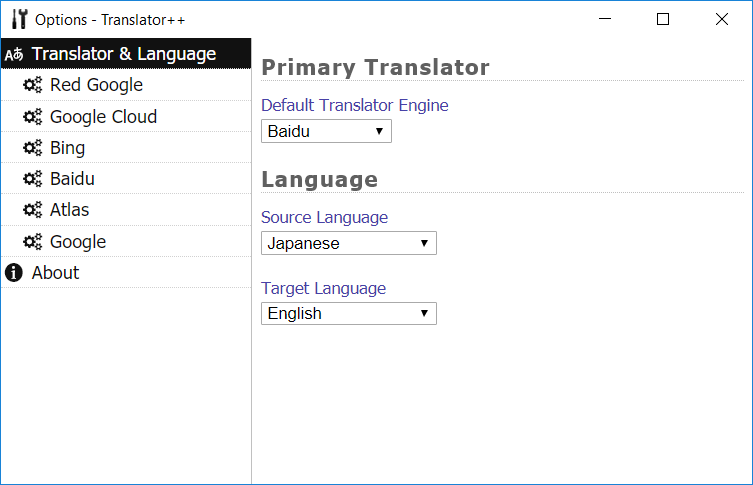
In Translator++ v 1.6.30, you can use Baidu to translate your game. But I think the translation on the “Translation Pane” will be slightly off because Baidu uses non standard naming for the language. For example, other translation agree that the language code for Japanese is “ja”, but Baidu want to make his own standard, it is “jp”... So, a minor problem will occur when all the translator engine translate simultaneously. I will fix this soon, hopefully on the next update.
Also, I think I’ll add Yandex for future release.
This version is available for download in the patron download page.
Also, Translator++ Ver. 1.6.17 that contains fix for Google Translate will be available for everyone.
Happy Translating.
Comments
Hey guys! I have this game I'm trying to translate, but it seems something's a bit off with the translator tool. It's a VX Ace-game, and when I try to "create" a new project, only half of the "Maps" are showing in the program. Am I doing something wrong after creating a new project?
2019-07-07 20:06:23 +0000 UTCHere's the error when using Wrapping Text: https://i.imgur.com/5UQ0QVE.png (sample is Map003 which has 9 rows)
2019-07-07 12:46:23 +0000 UTCHi Dreamsavior, I found a bug with "Wrapping text" feature. Sometimes it keeps loading for no reason at all, sometimes even with 1 file only. (RPGVXAce + Windows 10)
2019-07-07 08:47:08 +0000 UTCI can't connect to auto translators, except Bing, is this a bug? I attached an image below for my case: https://imgur.com/qOjyZD7
Kiko Doragon
2019-07-06 11:51:10 +0000 UTChow to make Baidu work? to i have to download something??
Ode to Joy Eva
2019-07-05 09:43:06 +0000 UTCI actually have a problem with the patch at the end of the translation. When i try to export the files back to the data folder, it states an error "could not parse", which results in a syntax error when I try starting the game. Now I want to know what exactly is causing the error so I can correct it. Thanks in advance
Nathum
2019-07-03 21:48:52 +0000 UTCFound problem in this ver 1.6.17, google batch translation. Idk if this really a problem because it's work fine when I try in games with 「」 or " " in text. Sometime in one box there are some text with more than 1 line and google not translate it well, make some translation line misplaced (example : from original box 11 translated into translation box 10) and mess other translation line. It's also hard to fix translation more than 2 lines because can't add new line with enter.
2019-07-03 11:18:54 +0000 UTCThx for the fast response to fix public version, I love your works from version 1.3 . Already translating 5 games with batch translation feature without problem until now (error 404).
2019-07-03 10:51:52 +0000 UTCGood stuff, yandex will be a nice edition. It's pretty good with phrase based translation.
Fealow
2019-07-01 00:21:36 +0000 UTCBravo?
Omar Soberanes
2019-06-30 16:53:23 +0000 UTC