



One day, I encountered a good doujin game at certain site. It has an exceptionally good user review, beautiful artwork along with captivating game play… on top of that, this game is distributed for free. But, too bad … this game is in Japanese, while I … just like the rest of 7 billion earth population … don’t speak Japanese.
So, after spending hours of agonizing research on aggregate tool, automatic translation tool etc… I came up with two conclusion. First, machine translations are suck when used as-is! Especially on handling inconsistent languages like Japanese. Sometimes with my limited knowledge of Japanese, the untranslated text are more understandable than the one translated using machine. Second, creating manual translations are painfully vexing without appropriate tools…. And unfortunately there are no such tool.
And finally I decided to create my own tool. A tool to combine the handiness of machine translation while accommodating manual translation.
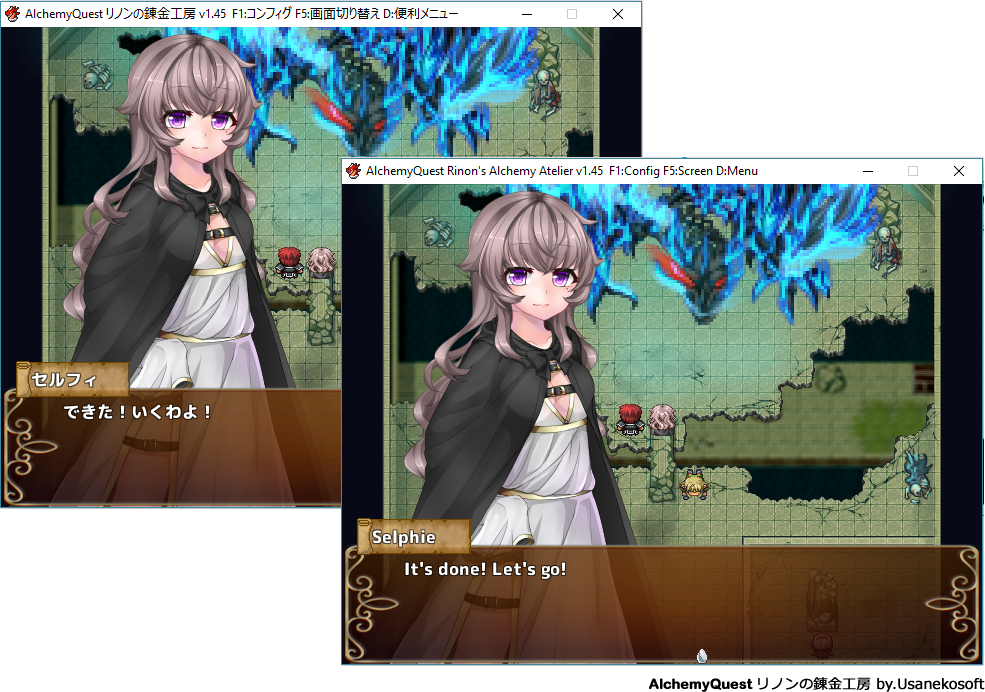
Here is the result of what Translator++ can do in about 3 minutes of work :
Not much? Well, the entire opening sequence of this game is translated, along with some manual translation.
Translator++ is pretty much Inspired by Atlas translation tool. By using grid view, we can have several translation and reference for one context. The best translation (the rightmost filled column for each row) will be used by the engine when deploying translation, while the older version of translation still retained.
Here is some feature from Translator++ :
Find and replace makes everything easier.
Your translation progress are visually tracked :
Automatic translation in the box
Who doesn’t like automation? If possible, we like to have the entire translation process done automatically…. by single click. Unfortunately, that’s hardly unrealistic for producing a quality translation … at least for now.
But we are trying our best to help you out from manual labor.
Translator++ equipped with tool to translate all in-game text using some of the most famous translation tool available.
This feature is mainly served as a reference to produce better manual translation. But yes, if you don’t care about translation quality … you have an option to translate everything using online or offline translation services just by a couple of click. -_^
You can trim your translation result to fit the game message box maximum length.
And … much more...
Translator++ is currently can handle RPG Maker XP, VX, VX Ace, MV and Wolf RPG Editor engine.
Also, I’m planning to work on some major visual novel engine (i/e Renpy) compatibility in the near future. Also, by the time I write this article... Translator++ is currently only support Japanese to English translation. More language support will be added soon.
I just started this project last month. Translator++ is currently in early development stage. It is pretty much unfinished. So, expect some bug here and there… But feel free to contact me if you find any.
Thank you for supporting my works.
Patrons will always have access to the latest version of Translator++.
Download
If you are a patron, use this link instead.
TITO AURELIANO
2020-09-03 20:47:11 +0000 UTCIwanther
2020-05-10 13:07:26 +0000 UTCSandro Di Silvestro
2020-03-11 23:59:32 +0000 UTCMissile Ranger
2019-08-02 04:14:30 +0000 UTCYllarius
2019-06-21 18:41:53 +0000 UTCDreamsavior
2018-12-24 16:21:25 +0000 UTCDreamsavior
2018-12-04 15:38:34 +0000 UTC