Derby Lands - Parsec BeamNG Server
Added 2021-08-28 05:58:21 +0000 UTC
I am asking for your help on testing a new Parsec Server for hosting BeamNG. You can sign-up to join the server by sending a request to "derbylands" in the Parsec App. This is only available to current Patreon Supporters. The server will be running 24 -7 for your enjoyment and collaboration with others. This is only for testing purposes right now.
HOW-TO install Parsec:
https://support.parsec.app/hc/en-us/articles/115002699072-Setting-Up-Parsec-On-Windows
To join the server you must agree to the following rules/terms.
RULES:
1) No moving or downloading files.
2) Your group may spawn a max of 20 vehicles.
3) Time limit for use is 45 mins per day.
4) Be nice to others or you will be kicked/banned.
5) Do not change menu settings without permission.
6) Your activity will be logged.
7) Server is only available to Patreon's.
SERVER TERMS:
1) There are no guarantees on server up time. Server may be down for service or events.
2) Server Limit 20 users max.
3) Request to add mods/skins in the Discord Derby Lands Test Server mod-request Channel.
4) In the event of the server being down post a message to the Discord Derby Lands Test Server server-down Channel.
5) Request to join the server through Parsec can take up to 24 hours for approval.
6) Sound, video, or controllers may not work or function properly.
7) Please help others who are trying to join the Server.
Connecting your Discord Account with Patreon
My creator just added Discord as a benefit — how do I get my Discord role?
If your creator is introducing Discord roles as a new benefit, don’t worry, as an existing patron, the new benefit will be extended to you.
When a creator announces that they’ve included Discord as a new benefit for patrons in your Tier, follow the steps below to access your role:
Step 1: Log in to your Patreon account, and head to the Apps tab of your Profile settings page.
Step 2: Click on the Connect button next to the Discord app.
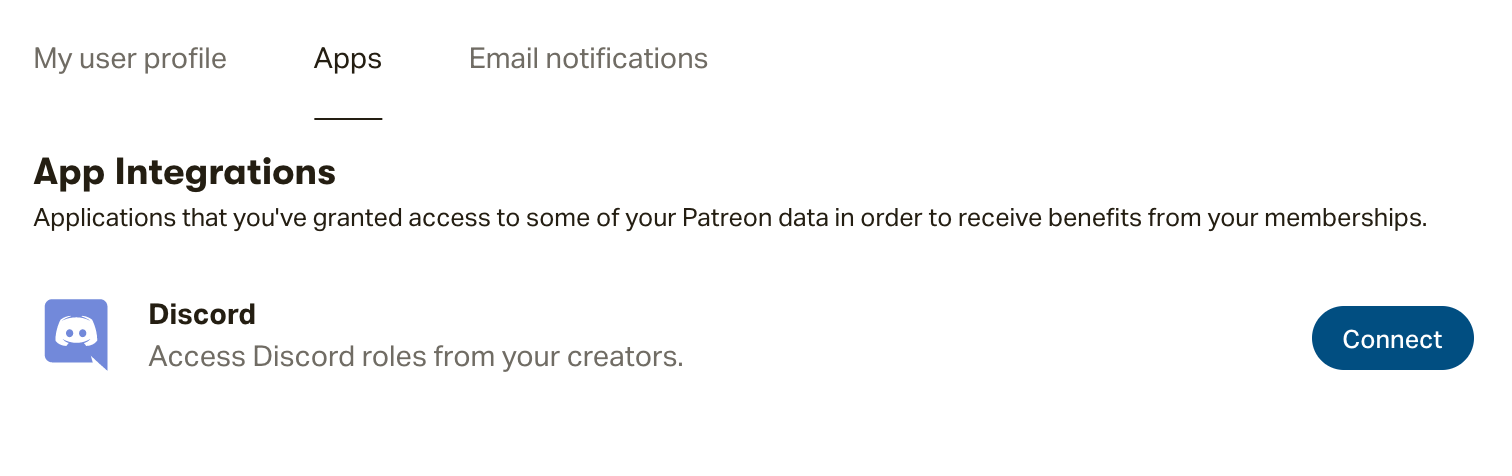
Step 3: Now that your Patreon and Discord accounts are communicating, our integration will assign you the role tied to your Tier!
You can access your new role by logging in to your Discord account.
Note: Already have Discord connected to your Patreon account for another membership? Then there's nothing you need to do! You should find the server for the creator who's now offering Discord populate when you next log in to Discord.