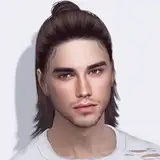
Chromatic1 Hairstyles Batchfix
Added 2021-01-24 16:43:53 +0000 UTCHey there!
I got some comments regarding random sims wearing the chunky/bicolour hairs in game, and obviously, without the other half of the texture. This was my mistake for allowing these hairs to be available for random.
I updated all chromatic1 hairstyles (in each post) with this option turned off, but also I leave here all of them so you don't have to go post by post to get the fix.
Another way to fix them is by opening S4S, and go to "Content Management" at the very top, then "Batch Fixes", "CAS", and "Disable for random". If you're not sure how to do this, please just replace the files as it will be safer for your CC.
Sorry for the issue, and hope you all have a great day 💙
Comments
Thank you for containing all the fixes in one post. I appreciate all your work!
Charmbird
2021-02-06 04:42:20 +0000 UTCNo prob! You're welcome 💙
Antonio
2021-01-30 17:31:00 +0000 UTCHi Linda! You have to download the extra textures for chunky and bicolour. If you check the chromatic collection post, the very last line has a link to them. Sorry for the issue 🙈
Antonio
2021-01-30 17:30:49 +0000 UTCGosh I'm so sorry for all the trouble 🙈 but glad it worked at the end!
Antonio
2021-01-30 17:29:57 +0000 UTCWhat issue was it? sorry I am like Dory and forget things easily 😂
Antonio
2021-01-30 17:29:31 +0000 UTCYou're welcome!! 💙
Antonio
2021-01-30 17:29:12 +0000 UTCYou're welcome 💙
Antonio
2021-01-30 17:29:03 +0000 UTCThank you Daniella 💙 Yep half of the hair is "gone" because the texture that is applied to that part has to be selected from hats/accessories
Antonio
2021-01-30 17:28:54 +0000 UTCYou're welcome! 💙 Same here, I go to cas, change the hair, take pic, close the game XD and that's why I never spot issues with animations in game, ooops hahaha
Antonio
2021-01-30 17:28:02 +0000 UTCThank you for fixing them! :D
Teresa Gustafsson
2021-01-30 17:18:43 +0000 UTCPut the hair on normally, go to hats and click on the hair options. They will have a similar icon
Daniella
2021-01-29 00:29:15 +0000 UTCI repaired my game first. Then I redownloaded the rar file, used a different extractor, then put it in my mods folder. It didn't give me any problems this time. Idk which one specifically fixed it, but I'm just glad it worked. 😁
Dezi A
2021-01-28 00:45:38 +0000 UTCI'm having trouble with the new files. I've downloaded a zip file where I get the original hair, the bicolour hair and the chunky hair. I have also download the base texrture. I put it in the game and its cool except the bicolour shows half of the hair gone. I checked the hats/rings/gloves etc. section and there isn't anything. Am I doing this right? Also I absolutely love all your hairs. Been a fan since forever.
Linda
2021-01-27 23:16:43 +0000 UTCHi! Could you please download it again? I downloaded the file and run the game and everything seems to be working, maybe the download got corrupted... Try and let me know if it works :)
Antonio
2021-01-27 19:16:55 +0000 UTCYuna seems to be broken. I extracted it from the rar file and then moved the package files to my mods folder. But when I went to start up my game, it wouldn't let me unless I deleted all the Yuna hairs.
Dezi A
2021-01-27 19:13:30 +0000 UTCIm having the same issues as before, helpp
rae
2021-01-25 06:48:01 +0000 UTCThank you so much!!
Whitney Adair
2021-01-25 05:17:22 +0000 UTCdid you use chromatic hairs before or just regular hairs? chromatic versions look half finished because you need to apply the chroma via hair to make it look finished. the purpose of that is to allow you to customise multi coloured hairs.
Daniella
2021-01-25 00:29:38 +0000 UTCI have this issue, even with the newer files, I just downloaded them and half of the hair is looking very strange, like it is broken.
MaryQuiteContrary
2021-01-24 19:22:38 +0000 UTCTy so much. I hadn't experienced any problems, however, I usually stay in CAS creating Sims lol. Thanks for this fix!!!
LeppLass
2021-01-24 18:12:14 +0000 UTCThank you!!
Rachel Withers
2021-01-24 17:46:41 +0000 UTC