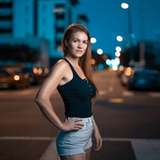
Something as simple as changing hue and vibrance in your photo can make a lot of difference and add drama or mood to the exposure. There are plenty cheap apps that do this automatically, and maybe one day soon they will do a near perfect job of doing so, but for the time being taking the time to create your own world goes a long way in terms of your style and body of work. There is also something rewarding about putting the thought and effort into a single photo.
I've touched on this editing tip briefly on IG and Youtube but here is a quick overview if you us PS or are just interested.

Start with an image that has some good color combinations in this case green and yellow.

Open a hue/satuartion layer and adjust the slider to achieve the desired color combination. I chose green to red yellow to purple.

However, we don't want Steph our subject purple... many times editors will blanket edit when it comes to making adjustments. Sometimes it is best to edit only certain parts of your image rather than applying the same edit to every aspect. So we need to mask Steph out of the edit we just applied. When you select the hue saturation layer you'll get a white layer mask as you can see in the layer section to the right of the image above. Using a black brush or any selection method you can color away the hue/saturation effect. So I simply and carefully colored over Steph using a soft black brush to reveal the original skin tones. (You can use the pen tool or quick selection methods to get a more accurate selection if you need)

After I got a rough selection of her without the hue layer on her skin, I need to color grade to get her skin to match the environment around her. I do this by applying a camera raw adjustment layer (Shift CMD A)


In Camera Raw in the color grading tab I will apply a color grading to the midtones of a red/orange color; in the basic tab I adjust the vibrance, contrast and hightlights. Here I do a blanket edit to tie all the elements together.

Lastly I apply a Curves layer focused on the reds to further add some red tones to the highlight areas.

David
2025-01-30 22:49:22 +0000 UTCMemoirs of Steph
2025-01-30 21:25:25 +0000 UTCMemoirs of Steph
2025-01-30 21:25:21 +0000 UTCMemoirs of Steph
2025-01-30 21:25:07 +0000 UTCnatureman
2025-01-30 21:19:46 +0000 UTCRay
2025-01-30 17:28:03 +0000 UTCJosep L. Guallar-Esteve
2022-03-30 01:22:16 +0000 UTC