TUTORIAL // drawing a stylized portrait in Procreate
Added 2023-06-05 09:00:04 +0000 UTCMany of you have asked for a Procreate tutorial, so I put this one together! I structured it a bit more loosely than I usually do, making it more of a 'draw with me' format that allows you to follow along with my workflow and try it out for yourself.
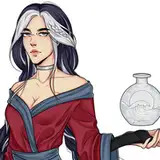
For those of you who want to try this process out on the same reference image, here's the image I used:

Here's the cheat sheet in image format, the PDF is available for download at the bottom of this post:


I mention a few different tutorials during this one! Below is a list:
- Constructing faces & expressions: This tutorial talks about which shapes I use to construct a stylized face.
- Sculpting with color: This tutorial runs you through the workflow that I used for adding color and detailing it later on.
- My workflow in procreate: this is my first procreate tutorial and covers similar ground as this one.
Another video that might be helpful to check out is this process video in which I draw the same image with two different stylization treatments.
The brush sets I mention in this video are:
I hope you enjoy this one! The subtitled version is coming up in a minute!
Comments
hey! i think i just use the default settings to be honest - i've never really tweaked it that much before. i'll look into it some more next time i sketch with it!
Loish
2025-03-12 11:29:03 +0000 UTCHi Loish, great tutorial as always! I would like to ask you a question about: What kind of pressure curve do you use on Procreate? If you use a specific one. I would be curious about it, I hope you will answer. I wish you a good day :)
Frankizilla
2025-03-11 14:38:42 +0000 UTCHey Elisa! I'm so glad you enjoyed the tutorial! I usually have gouache clean brush set as my eraser. I definitely understand what you mean about losing time choosing a brush, it can get so confusing! that's why I stick to gouache clean for almost everything when it comes to color. my procreate process is a bit slower than my photoshop one because I'm usually in this process of trying to figure out what works best and it can definitely knock out the momentum!
Loish
2024-12-09 12:55:17 +0000 UTCThank you Loish for this tutorial! Do you use the same brush for paint and to erase? I lost a lot of time choosing a brush...then choose the right brush to erase...it seem i lost a lot of time for anything in digital painting :D maybe I need some experience...but I don't like to continue jump from a brush to another... here you use Gouache brushes...but my dream is find a set of brushes and use always theese :D
Elisa Bertoldi
2024-12-07 18:40:52 +0000 UTCThanks so much for this helpful tip!
Loish
2023-11-13 15:17:51 +0000 UTCI'm so late to this commenting , another great process video , your lasso painting method prior honestly changed my own process and I love it, Just a quick tip for anyone who want to check their values real easy on and ipad , you can actually set up your ipad to go to greyscale with 3 clicks of the power button and back to color with the same , follow https://youtu.be/Xo2zWuZoUFY?si=etuy5FVjtv2F6L7B the instructions are there
Kevin Casey
2023-11-13 15:17:26 +0000 UTCso sorry about that! it's fixed now!
Loish
2023-06-18 16:46:39 +0000 UTCJust noticed that the link for the Constructing Faces and Expressions tutorial goes to the Constructing a Pose tutorial instead.
Josh Freeman
2023-06-16 20:50:10 +0000 UTCit turned out lovely!
Loish
2023-06-16 08:15:57 +0000 UTCThis is so so so amazing omg thank you so much 😭🖤
Luna
2023-06-15 10:54:02 +0000 UTCHi Loish! I'm so happy you're doing some Procreatetutorials too :) Thank you for the great work you're doing here <3 I went straight to work and created my own version with the help of your video. You're welcome to take a look! [IG: Doodl.Artist]
Doodl.Artist Jessi
2023-06-11 15:31:54 +0000 UTCThis changed my world! Thank you!
Lisa Loo
2023-06-11 15:29:52 +0000 UTCCrystal clear! :) thanks a lot
ArtG
2023-06-09 11:03:54 +0000 UTCgood question! that might be worth creating a resource on in the future to explain it a bit further. but the short answer is that multiply layers are a really fast way to get a darker shadow color without painting "over" the detail on the layer below. just picking a darker color would result in me painting over the lines and texture - they would disappear under my new brush strokes. with a multiply layer, the lines and texture of the layer below remain visible. the same applies to a screen layer, except it creates a lighter color instead of a darker one. when i paint in a 'normal' layer mode, it's when i'm consciously painting over my painting - so i know that my brushstrokes will cover up and change the existing detail underneath. does that make sense?
Loish
2023-06-09 09:07:59 +0000 UTCArtG, I agree. I got lost with the multiply/screen layer adding. It was a little too fast, but maybe it is geared towards creators who already know how to use them effectively. I work the way that you mentioned without getting into the color adjustments. Sometimes I do that in Photoshop because what she said is correct. The color looks different on the iPad. I did love watching Loish's beautiful way of shading. My goal is to have softer/looser lines in my style so this was amazing to see. Thank you so much for sharing Loish!
Lisa Johnston Hancock
2023-06-08 18:48:32 +0000 UTCVery interesting process ! Something tilted (and now it feels so obvious!) when you said we should focus on two or three things to stylize and not trying to go all places. I have a question though on your layer choices. I can't really understand how you choose between normal and multiply layers when it comes to painting (not talking about the initial line art). I know that with multiply you mix colors, but why not using a normal layer and just try a color (and change it with your shifting technique) while painting shadows and everything else? There’s something about the « science » of the multiply layers that I haven’t understood yet when it comes to coloring. Same for the « screen ». Why not go with a normal and a saturated yellow for exemple? It would be helpful if you could go just a little bit slower in future tutorials when you explain what you do with your layers. Thank you very much !
ArtG
2023-06-08 17:29:26 +0000 UTCit can definitely help to learn realistic proportions if you're worred that your stylized work feels less accurate! although i don't think it's a requirement, and it can be something you get trapped in as well. just make sure your realistic studies are learning-focused and not just about copying what you see!
Loish
2023-06-08 11:49:48 +0000 UTCLove this tutorial, and this format! Question: Do you recommend first learning to accurately draw portraits realistically and then move away from the realism? Bc I find that when I try to stylize it often just doesn't really look quite right.
Ruth
2023-06-08 05:54:38 +0000 UTCso happy to hear that! i'm glad you enjoyed this technique :)
Loish
2023-06-07 08:33:42 +0000 UTCi'm glad you liked it!
Loish
2023-06-07 08:31:29 +0000 UTCI really like this "draw with me" video, it was really fun and I like you are trying something else with your workflow, it's really cool to see you experiment and take pleasure to it. Thanks for sharing, now I want to try that too on my ipad !
Alex Roger
2023-06-06 16:45:59 +0000 UTCThank you so much Loish!! 💕💕 I feel like I leveled up just from watching this and playing around while watching it I added a few touches to my last portrait and it has suddenly come to life =‘) can’t wait to start a new one from scratch using this technique, I love the rough color approach and the life it gives to the painting!! You are an art goddess for real!!! 🥰🥰🥰
GothRisa
2023-06-05 18:33:14 +0000 UTCMy biggest dream is to be like you and hear these words from someone!! 💖
Melike Miyanyedi
2023-06-05 12:39:59 +0000 UTCI’m so excited for this one! I’m at the stage where all my art workflow needs something painterly. Thank you!!
Samantha Jeffers
2023-06-05 12:29:56 +0000 UTCi'm glad you like it! hopefully this will be a bit easier to follow than that sped up video!
Loish
2023-06-05 12:11:34 +0000 UTCso happy to hear that melike!
Loish
2023-06-05 12:10:16 +0000 UTCThank you so much Loishhh for tutorial and cheat sheet :))) You bring so much to me, and I am improving more because of you. ❤︎☺︎
Melike Miyanyedi
2023-06-05 10:41:58 +0000 UTCPersonally, I learn a lot more with this kind of videos. Thank you! 🫶 In fact, when I starded I based my workflow off of two old videos of yours. One of which didn't even have audio and was very sped up so I had to constantly pause to see what tools were used.
Juan Gagliardo
2023-06-05 10:04:16 +0000 UTCYay!! It’s here!! Can’t wait to finish work and dive into it 😍😍
ElDoodles
2023-06-05 09:14:27 +0000 UTC