TUTORIAL VIDEO // simple tricks for lighting & mood
Added 2020-09-08 09:30:40 +0000 UTC
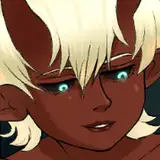
It’s time for this month’s tutorial, and this one is on simple tricks for lighting and mood! Basically I’ll show you guys how I add lighting to my art when I’ve already picked the base colors. Hopefully what you’ll get from it is that you can use some simple shortcuts / tricks to push your art towards a specific mood.
Quick disclaimer: I use the term ‘rim light’ very often, sometimes a bit gratuitously because what I really mean is just a sharp lighting source that casts a distinct highlight on the character. I think of it as a ‘rim light’ because it defines the edge of the character, but it’s not always the right term to use - apologies for that! Hope you still get what I mean when watching it!
Some stuff I mention in the video:
• The character I drew is basically a re-take of this one: https://blog.loish.net/post/85827164568/manga-style-art-i-know-this-is-a-contested-term?is_liked_post=1 I just kinda felt like drawing her, hehe!
• In order to draw her, I used principles that are explained in more detail in some previous tutorials. They are the construction tutorial: https://www.patreon.com/posts/tutorial-video-38377684 and the color choices tutorial: https://www.patreon.com/posts/tutorial-colors-39277902
• The brushes I used for the lighting are from Shyioon Kim’s ink brush set, which you can find here: https://gumroad.com/l/shiyoonink Any textured brush works good for this technique though!
Hope you find this useful and can implement these tricks in your digital art! Next week I’ll be doing a procreate tutorial, so if there’s anything specific you want to learn about that, drop it in the comments and I’ll try to implement it!
thanks so much aline!
Loish
2023-07-03 12:25:55 +0000 UTC
Great tutorial! It expanded my perception of light and dark and how to apply light/color to my paintings. Thank you.
Aline Cordeiro
2023-07-01 13:25:26 +0000 UTC
Thank you so much for taking the time to answer me! :) In fact, I hadn't seen your other post yet about the links to access the videos on Vimeo, because I signed up to your Patreon yesterday at dawn and still haven't been able to calmly browse the contents. Anyway, yesterday when I accessed this content for the first time it was through my cell phone (and that's when it showed that the video wouldn't be able to be loaded), however, today I accessed the same content through my laptop and everything performed correctly. I look forward to learning a lot from your process and experience. :) I'm a Procreate user, so it will be a very nice experience to be able to bring your experience from other tools to my reality. Congratulations on the wonderful work! Kisses from Rio de Janeiro :X
Bianca Martins
2022-06-17 16:30:19 +0000 UTC
hey bianca! you should be able to watch the video without having to pay for a membership. if you click the link in this post, it should take you to a playable version of the video: https://www.patreon.com/posts/update-subtitled-64518198
Loish
2022-06-17 12:47:14 +0000 UTC
Hi , Loish! Nice to meet you! I’ve just joined your patreon and I can’t access this video either. I already tried the options you gave before. I tried the option to watch via Vimeo, but I just saw that Vimeo is paid, so I don't want to have to pay just to watch a video that I'm already paying for patreon. Was there any other possibility? Thank you for your help.
Bianca Martins
2022-06-17 09:46:16 +0000 UTC
I'm so sorry to hear that! for now the best solution would be to watch it through vimeo at this link: https://www.patreon.com/loish
Loish
2022-05-07 10:28:52 +0000 UTC
Hi , I’ve just joined your patreon and I can’t access this video either.
Maria G
2022-05-06 22:01:42 +0000 UTC
that's very odd! you should be able to open it. perhaps it might work if you try a different method (for example, browser on your desktop)? if not, here's a list of links you could try out as well: https://www.patreon.com/posts/update-subtitled-64518198
Loish
2022-04-19 07:50:58 +0000 UTC
Sorry, is it supposed to be locked? cause I can't open it though I can open any other video tutorial
AspenAspid
2022-04-15 16:19:58 +0000 UTC
Thanks Loish! Much appreciated I’m using Clip Studio
Brock Stewart
2022-01-28 12:46:41 +0000 UTC
hey brock! here's a step-by-step that might help you out - https://www.patreon.com/posts/step-by-step-36570445
which app are you using? in photoshop and windows, you make the selection first, and then press ctrl + b to activate color balance.
Loish
2022-01-28 09:34:26 +0000 UTC
Can you give me the steps? When I do the lasso there is no color balance option. If I go to the section that shows color balance it’s grayed out….
Brock Stewart
2022-01-28 03:15:53 +0000 UTC
hey brock! once you have made your selection with the lasso, you can then activate a modification tool (like hue/saturation or color balance). the modifications will only apply to the selected area.
Loish
2022-01-27 09:01:54 +0000 UTC
Hi, so I don’t see anywhere on the Lasso. Tool where I have an option box to lighten darken etc.
Brock Stewart
2022-01-26 18:18:30 +0000 UTC
Glad you like it Raquel!
Loish
2021-03-11 10:48:04 +0000 UTC
THIS IS SO HELPFULL! thank you so much, Loish!
Raquel Ardon
2021-03-05 18:06:11 +0000 UTC
that's a great idea actually! i was thinking about expanding my patreon and adding a tier with lesson material for practice. very little time to make that happen at the moment but i am making plans for the future :) thanks for your kind words by the way, I'm glad you liked it!
Loish
2021-01-21 10:00:51 +0000 UTC
Loved this tutorial, I’ve been watching all your tutorial videos! Your such a great teacher!
I’d love to see work sheets for things like this (like you did for your procreate process) I find it easier for referencing back to once printed off (in little notes highlighting key things) rather than having to scrub through the videos each time. Or if you put it all in to a new book that would be amazing!
Danielle Davies
2021-01-20 14:26:19 +0000 UTC
This video has so many useful tips! Thank you so much for that!! Definitely gonna try those out!
mssundayart
2020-12-30 20:38:58 +0000 UTC
glad you like it kiki! :)
Loish
2020-11-30 10:27:54 +0000 UTC
This was great. I'm glad I finally got to sit down and watch it. I learned so much! I'm working on a piece right now and I think I want to see how I can apply one or more of these techniques!
Niquey
2020-11-28 18:16:18 +0000 UTC
Just joined Patreon and this is just what I needed to see! Been trying to play with lighting unsuccessfully for ages, I think this will help a lot. Thank you so much for sharing
Kiki
2020-11-27 10:21:55 +0000 UTC
Really nice... Thank you so much Loish😊
TOBI
2020-11-17 19:47:45 +0000 UTC
so glad you enjoyed it! hope it helps you in your drawing process moving forward :)
Loish
2020-10-26 08:49:15 +0000 UTC
Thank you! All of your tutorials are mesmerizing and super helpfull <3 I always want to paint or draw something after watching them :) This one was very informative for me, as I always struggle to find good lighting or the right colors for a mood I have in mind.
Natalie Behle
2020-10-23 16:49:11 +0000 UTC
Woah! I've learned a lot by just watching it! Thank you :3
learclow
2020-10-09 02:46:49 +0000 UTC
I cannot wait for the procreate tutorial because there is SO much good stuff in here and I’m trying to figure out how to adapt it to procreate ❤️🙏
Lalita Marvin
2020-10-03 08:42:47 +0000 UTC
Very useful! Thank you Lois 😊
sandviart
2020-10-02 16:04:25 +0000 UTC
This was great, put it into practice immediately (trying to adapt to Procreate)! I‘m not getting any faster, though, because new techniques inevitably make me play around a lot :D
Kolja Kähler
2020-09-20 21:48:43 +0000 UTC
This was so usefull! Thank you! 🌹
Martina Medveďová Hijazi
2020-09-19 12:47:44 +0000 UTC
Thank you so much for this tutorial! Lighting scenarios and effects are the think I struggle with the most and this gives me some great tips and examples!
Christina
2020-09-18 09:54:34 +0000 UTC
next month i'm doing a procreate tutorial, but after that i'll put up the poll again and let you guys vote on what's next!
Loish
2020-09-17 08:56:37 +0000 UTC
Also loish can we have a hair tutorial next moth..i seriously need a good hair tutorial
Aadishri Soni
2020-09-16 13:02:32 +0000 UTC
Incredible tutorial! Thank you
Catvin
2020-09-15 16:28:16 +0000 UTC
yes! you can just use control + U. if it opens a new layer, then it's an adjustment layer, which is slightly different than just image > adjustments > hue/saturation.
Loish
2020-09-14 09:47:28 +0000 UTC
i don't have any procreate tutorials just yet but i will be making one next month!
Loish
2020-09-14 09:46:11 +0000 UTC
Amazing tutorial! So helpful! Thank you Loish!!!
Desi NN
2020-09-13 20:31:29 +0000 UTC
Another great tutorial where I feel like I learned a lot, thank you Loish! <3
Mowen
2020-09-13 15:21:58 +0000 UTC
Really loved this one!!
ursulalopez
2020-09-12 16:26:01 +0000 UTC
This was so helpful! Thank you so much!
Beth Martin
2020-09-12 09:31:50 +0000 UTC
This video was very helpful!! I’ve been a patron for a few weeks now and I recently got procreate for my iPad, do you have tutorials where you use procreate when creating characters?
Kyla Dunning
2020-09-12 03:33:17 +0000 UTC
This tutorial is very usefull, thanks a lot ! I was wondering, how do you open the "hue and saturation" panel witout creating a new layer ? Is there a shortcut I've missed ? :o
Gabi
2020-09-11 16:38:24 +0000 UTC
glad you like it! thanks so much for your support tyler!
Loish
2020-09-11 08:42:23 +0000 UTC
Incredible tutorial Lois! I've only been a patron for a couple weeks, but your content is blowing my mind. I am so glad I joined!
Tyler
2020-09-10 23:24:47 +0000 UTC
So helpful!!!
Jac
2020-09-10 16:47:08 +0000 UTC
thank you!
Viktoria Nam
2020-09-10 12:04:55 +0000 UTC
thanks! i'm glad you like it! it's been so helpful for me to just wing it, so any tool that gives me the option of exploring - rather than locking in options early on - has my preference!
Loish
2020-09-10 09:47:17 +0000 UTC
so glad you found it useful!!
Loish
2020-09-10 09:46:29 +0000 UTC
haha! maybe one day!
Loish
2020-09-10 09:46:20 +0000 UTC
This is amazing! I wish there was an art school of Loish :)
Radka Kopecka (radu.k.art)
2020-09-10 08:53:40 +0000 UTC
This literally changed my approach! Understanding that light is colour is what I was missing in my art. You are the most amazing teacher I've ever had and I am so thankful!
MJ
2020-09-10 06:11:48 +0000 UTC
word! When I first learned about how you (Lois) handle color and light my mind simply was blown. 💖Wow you should make a schoolism class or sth...
Looona Lou
2020-09-09 21:38:36 +0000 UTC
I am so happy to be on your patreon. This. Is. AMAZING. Learned so much, thank you!
Megs
2020-09-09 20:39:10 +0000 UTC
The use of a feathered lasso combined with colour balance is a brilliant combination. I'm just getting my feet wet with choosing colours and this tutorial is super useful. I really enjoy the natural process of colour exploration using balance/selective colour and seeing where that takes me. Thank you, Loish!!
Tom
2020-09-09 17:39:08 +0000 UTC
This was so rich and good for a lot of newcomer artists. It just opened a complete new way of working and thinking. Thanks a lot, really !! ❤️
Jean-Philippe Morasse
2020-09-09 14:39:13 +0000 UTC
thanks so much :)
Loish
2020-09-09 09:22:45 +0000 UTC
ah, so happy to hear that! glad you like it!
Loish
2020-09-09 09:22:32 +0000 UTC
ah, so glad you like it!! i have the james gurney book, it's incredible! but sometimes i'm not sure what to do with it because it's so technical. i'm glad you enjoyed the tutorial!
Loish
2020-09-09 09:20:57 +0000 UTC
so glad you like it!!
Loish
2020-09-09 09:20:09 +0000 UTC
i'm glad you like it!! i'm personally not great with technical jargon, something about it makes me zone out when i'm hearing it. i hope this is easy to understand! :)
Loish
2020-09-09 09:19:55 +0000 UTC
Super super helpful thank you sooooooo much and thank you for dropping the super technical art jargon and speaking in such a comprehensible way! * gets to work*
kwarateen
2020-09-09 04:06:27 +0000 UTC
This is super helpful, thank you so much! I had so much fun playing with it!!
Shirley Swa
2020-09-09 03:00:12 +0000 UTC
Wonderful tutorial, very helpful, thank you!
Garciartist
2020-09-09 01:43:15 +0000 UTC
Ahh this is awesome! Thank you!!
Kat Craig
2020-09-08 21:35:24 +0000 UTC
Holy wow thank you, you are amazing and wonderful at presenting this in an understandable and approachable way.
Kathryn Cook
2020-09-08 21:12:53 +0000 UTC
WOW! When it comes to lighting, I obsess over it. From James Gurney to Nathan Fowkes to whatever I can find, I have learned from many. Your approach to lighting is suited for the beginner on up. after 11 years of lighting, I learned a lot from this. Easily a 50$ tutorial...thank you!!
Joffery Black
2020-09-08 19:50:27 +0000 UTC
Thanks a lot for this tutorial <3
Jecineide Carvalho
2020-09-08 18:41:51 +0000 UTC
These are honestly the best tutorials I've seen on the internet. I feel like I'm taking a demo/class in college again. Thanks for all the great tips!
Kataraqui
2020-09-08 14:54:18 +0000 UTC
Thank you so so much for this tutorial!
Lucile L
2020-09-08 14:38:33 +0000 UTC
your tutorials are legit so so good ;-; thank you!!
Hannah Daigle
2020-09-08 11:10:59 +0000 UTC
yess thank you so much😍😍
Aadishri Soni
2020-09-08 10:21:49 +0000 UTC