NokiMo
deliriumbear
deliriumbear

patreon


夏色のコワレモノ After - 大介ルート 1B

** If you can't play the attached videos normally, please try the zipped file "Alternative Videos". It should be fine**

I wanna make a better quality format of the video that's why I changed some settings, but somehow they can't be played by some of you guys. I'll stick it back as before by now, I have to find another way to refine it better.. Sorry for the problem caused by this..!

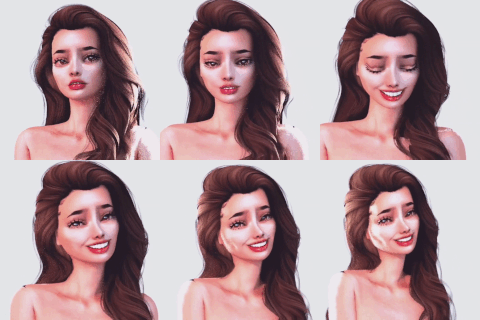
**Thumbnails are only the Sample, please Download the original one below**

Sorry for the late post, there are Timeline issues again.. Also I made more extra Videos members only this time:

3 separated phases loopable zoom out videos & 1 Extra angle video.

Don't worry~ I'll make another post within 2 to 3 days~ Thank you very much~!

Scene Data, Extra & Original Videos are below:

夏色のコワレモノ After - 大介ルート 1B 夏色のコワレモノ After - 大介ルート 1B 夏色のコワレモノ After - 大介ルート 1B 夏色のコワレモノ After - 大介ルート 1B 夏色のコワレモノ After - 大介ルート 1B 夏色のコワレモノ After - 大介ルート 1B 夏色のコワレモノ After - 大介ルート 1B

Comments

Sorry for the late reply. I reuploaded the scene that solved the eye problem~ It should be okay now~! For the nodes constraints problem, as I know this mod do not support (Penis target) settings after character changing. It'll disappear or just not functionable. It has the same result even I changed the exact same character or tried it on other creator's scene. Please let me know if the eye still turned white in scene, sorry for the inconvinent.. Thank you very much~!

DeliriumBear

質問があります。私の環境では、DLしたシーンデータの涼花と大介が白目になってしまいます。「大介ルート1A」に添付されている涼花と大介のカードを使うと瞳は表示されるのですが、今度はヴァギナとSOSコックの設定が解除されてしまいますので解決方法があるのなら、教えて頂けませんか?

柴愁

Is it only 02C? I have checked all the videos & they're already encoded in the same way that can be watched.

DeliriumBear

Even alt loot c doesn't work for me

KawaiiDestro

Ryoka Bed - 02 Extra Loot C.mp4 even alt version doesn't work for me

KawaiiDestro

I have already deleted the animation speed in the re-upload scene data. But it seems not working for you..

DeliriumBear

find the timeline button and click right mouse you can see many options can check find animation speed and cancel it

常宇 陳

excuse me, can you tell me how i can disable or delete the "animation speed" plese?

maomao mao

I'm sorry about that.. That's really mistery for me.. As soon as I know what's happen & how to fix it, I'll re-upload them again..!

DeliriumBear

It didn't work, but thanks for trying.

maomao mao

I have re-uploaded the scenes, please download them again & have a try. I hope you can run them normally now~!

DeliriumBear

I'm very sorry but, can you tell me how I can do that, a small tutorial, I adore your work and that's why I want to enjoy it

maomao mao

i find it , it's work!! thanks a lot ^^

常宇 陳

Please try to disable both "animation" & "animation speed", or even delete the "animation speed" to play. I think it's the animation bug that can't be loaded in some circumstances. I'll try to avoid those bugged animations in the future..!

DeliriumBear

I still can't figure it out why it suddenly happened like that.. Please try to disable both "animation" & "animation speed", or even delete the "animation speed" to play. I think it's the animation bug that can't be loaded in some circumstances.

DeliriumBear

i have the same problem, no idea how to fix it

maomao mao

my card stuck too. i read About Me and put "Mixamo animations for CharaStudio v3" in the mods folder but it doesn't work

常宇 陳

Please disable the animation from Timeline & try. If it works, it should be the animation mod's problem. Please make sure the mod is properly installed, but another problem is the animation may have chance of dislocation. but I yet don't have another solution to deal with it.

DeliriumBear

i'm in the same boat. and yeah i downloaded the mods on the about. I found that if i play the scene frame by frame it can move but it won't play contionously don't know why.

Skiiva

Please read the "About Me" page for game version & mods list. Thank you~!

DeliriumBear

Why the characters do not move in the scene file, is it need any module?

暴风 SA

Idk the exact problem of this. Do you have the mods needed on "About Me" page? Because Characters have been used modded shader on skin, also other mods which are the must for loading the scene. It maybe the reason cause this. But I'm not sure about that..

DeliriumBear

Why is the card stuck in the studio when clicked and played?

Rendaivous

Glad to help~!

DeliriumBear

Thank you. Your stuff is the absolute best by the way. You’re definitely my favorite.

Dustin M.N.

Sorry for that problem, I wanna make a better quality format of the video that's why I changed some settings, but somehow they can't be played by some of you guys. I record them again & post a zip file called "Alternative Videos", it should be fine to play..! I'll stick it back as before by now, I have to find another way to refine it better.. If there are still any problem, please feel free to tell me. I'll try my best to fix it, thank you very much~!

DeliriumBear

All of these videos output fine.

태자 왕자님

Videos not working/can’t be viewed. This really sucks.

Dustin M.N.


Related Creators