
How to Change World Names
Added 2019-09-12 21:21:20 +0000 UTC
Hi everyone. I’m retiring my World Name Changer Mod. It only allowed you to change the names of worlds in new saves. Here’s a working method to allow you to change the names of worlds in ANY save game.
1. First, you’ll need Sims4Studio. Open the program, and click My Projects.
<figure>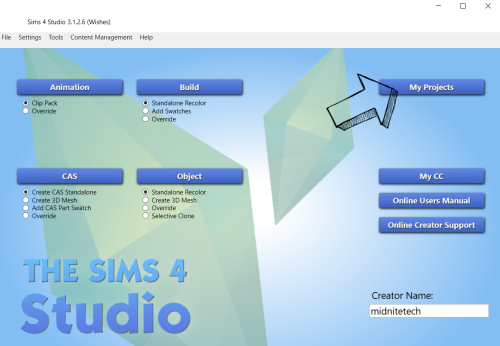 </figure>
2. Navigate to your Saves folder, and select Sims 4 Save (*.save) as your file type. Select your save and click open.
<figure>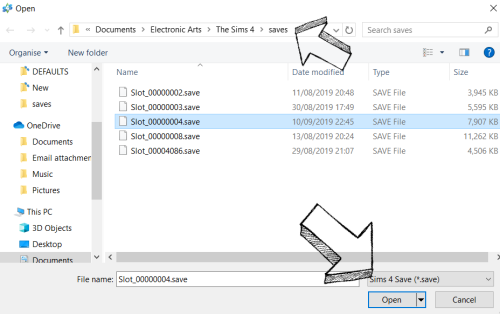 </figure>
3. Click Type to sort the list, and choose Save Game Data.
<figure>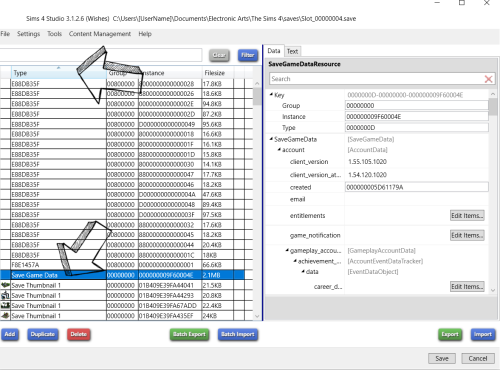 </figure>
4. In the Data panel on the right, scroll down until you find ‘neighborhoods’ and click Edit Items…
<figure>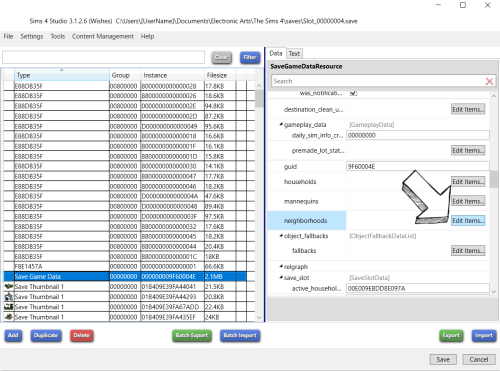 </figure>
5. Now, choose the Worlds you want to rename. Some are blank, some say ‘Office Site’ but you can ignore those. Rename your worlds under ‘name’, and click Save. When you’re finished, click Save again. Now load up your game and enjoy your renamed Worlds!
<figure>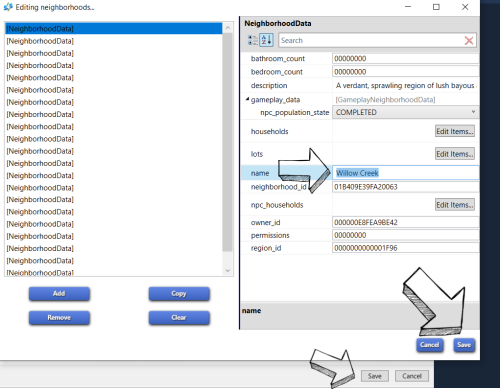 </figure>
Comments
Does anyone happen to know how to do this on Mac?
2019-09-24 17:09:06 +0000 UTCThank you so much for this post and for the amazingly detailed explanation and screenshots!!
2019-09-15 16:49:27 +0000 UTCThank you for the detailed explanation and the screenshots are very helpful! Thanks for sharing this.
Vickie F
2019-09-13 00:34:43 +0000 UTC























![[takeostudios]](https://nokimo.com/istorage/106010.jpg)