r3.1, Plans, and Polls!
Added 2019-06-22 02:08:38 +0000 UTCI've updated the links in the release to r3.1! Fixes lots of bugs! Change log attached at the end.
Shift should now work for triggering a random encounter.
As well, Mac save files were being saved in a strange way. Richard Penner's provided a code update, which should fix that (Thanks Rich!) You may have to transfer your save files again. Instructions provided again below:
---------
If you want to transfer your save file from LD+ r2, you cannot do it the usual way! Instead, please follow the instructions below:
1. Open LD+ r3, and make a save file anywhere.
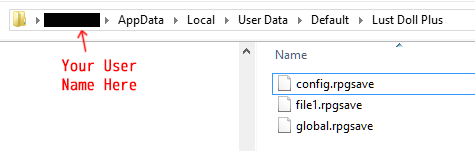
2. Go to your computer's file explorer, and go to your appdata folder and locate Lust Doll's save folder.
Windows: /(username)/AppData/Local/UserData/Default/Lust Doll Plus
Mac: /Users/(username)/Library/Application Support/Default/Lust Doll Plus
Linux: /Users/(username)/.config/KADOKAWA/RPGMV/Default/Lust Doll Plus
(May need to sudo nautilus if you don't have access to .config)
Also, pasting L2.2 save files there didn't make them appear ingame, though I could watch saves being created there appear, and files in that folder that were deleted no longer appeared ingame.
https://i.lensdump.com/i/WMaLFZ.png
3. Copy your save files from LD+ r2 to this new location. Make sure to copy everything, including global.rpgsave, or your save files might not appear!
---------
As well, it was requested that I also provide a way to keep the save and config files localized to the game folder, the way it worked before (which makes it easier to transfer your game between computers.) If you hold Shift on the title screen, then load or start a new game, it will set the game to this behaviour (a chime will also ring to signal that it worked.)
Note, you'll need to do this each time you start up the game, but only once, on the title screen.
Here's the current poll results.

For next month, I'll open up the rest of New Ark City, as well as get Transylvania underway!
Changelog
3.1
-Fixed Pink Panties image file missing
-Added hidden option to choose whether to save files locally or globally
-Changed how saving works
-Fixed bug where giving Cassie big fish opened sell menu
-Fixed bug preventing 'Shift' from working
-Fixed bug preventing Arlene's alternate form from showing
-Fixed layering issue with belly tattoos
-Fixed bug where tattoos don't move with body
-Fixed bug where after masturbating, masturbating arm stays
-Fixed bug where cock appears outside clothes
-Fixed bug where restaurant doesn't recognize clothes
-Fixed bug where clothing items could be used like regular items
-Fixed bug where you stop being able to do stripper job after handcuffs scene
Comments
Thanks, I'll add instructions above. For second part, you need global.rpgsave in there as well for the savefiles to show up.
Indivi
2019-06-24 18:02:40 +0000 UTCOn Linux (my Ubuntu), it's Users/(username)/.config/KADOKAWA/RPGMV/Default/Lust Doll Plus Which is particularly inconvenient because users don't have access to .config; I had to sudo nautilus. Also, pasting L2.2 save files there didn't make them appear ingame, though I could watch saves being created there appear, and files in that folder that were deleted no longer appeared ingame.
Darth Bayes
2019-06-24 07:37:07 +0000 UTCThanks, fixed!
Indivi
2019-06-23 02:55:45 +0000 UTCThanks, fixed!
Indivi
2019-06-23 02:55:04 +0000 UTCThanks, I'll fix it!
Indivi
2019-06-23 02:54:29 +0000 UTCThanks for the updates. You have (above and in the zip): Library/Application/Support/Default/Lust Doll Plus But it’s actually (relative to the home directory): Library/Application Support/Default/Lust Doll Plus or (fully qualified): /Users/(username)/Library/Application Support/Default/Lust Doll Plus
Richard Penner
2019-06-22 15:34:37 +0000 UTCAbove glitch also happens with lust tonics
Vyse Jakkya
2019-06-22 12:27:07 +0000 UTC