Lust Doll Plus r3.1!
Added 2019-06-19 19:50:44 +0000 UTCEdit3: Okay, this time Android version should be okay! (I hope.)
Edit2: Android version updated!
Edit: Now r3.1!
Hi all, here's the next release for LD+!
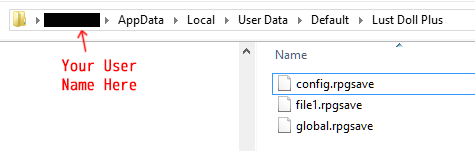
Note: If you want to transfer your save file from LD+ r2, you cannot do it the usual way! Instead, please follow the instructions below:
1. Open LD+ r3, and make a save file anywhere.
2. Go to your computer's file explorer, and go to your appdata folder and locate Lust Doll's save folder. Mine for example is at /(username)/AppData/Local/UserData/Default/Lust Doll Plus
3. Copy your save files from LD+ r2 to this new location.
You only have to do this once. From now on when you update with new releases, the game should automatically keep your save files, meaning you don't have to manually transfer them anymore!
I'm also told that this'll fix save issues with the Mac version. Please let me know if it works for you!
r3.1:
In-browser: Link Password: banana
Win: Link
Mac: Link
Linux: Link
Android: Link
Changelog:
-Fixed Pink Panties image file missing
-Added hidden option to choose whether to save files locally or globally
-Changed how saving works
-Fixed bug where giving Cassie big fish opened sell menu
-Fixed bug preventing 'Shift' from working
-Fixed bug preventing Arlene's alternate form from showing
-Fixed layering issue with belly tattoos
-Fixed bug where tattoos don't move with body
-Fixed bug where after masturbating, masturbating arm stays
-Fixed bug where cock appears outside clothes
-Fixed bug where restaurant doesn't recognize clothes
-Fixed bug where clothing items could be used like regular items
-Fixed bug where you stop being able to do stripper job after handcuffs scene
Comments
explains that I suppose XD
Lunaraia
2019-06-24 17:40:31 +0000 UTCOh right sorry, it's a cock tf scene. I'll come up with a non-cock scene for her.
Indivi
2019-06-24 17:39:47 +0000 UTCafter I beat her there is a crowd outside so I can't enter, I rest, i enter the shop go for normal or happy ending nothing new.
Lunaraia
2019-06-24 17:36:00 +0000 UTCYou need to beat her with lust attacks, then humiliate her in front of everyone. Then next time you visit her shop...
Indivi
2019-06-24 17:32:05 +0000 UTCThanks, will fix!
Indivi
2019-06-24 17:30:38 +0000 UTCcan't seem to get lin lin's new revenge scene just same old tickle torture
Lunaraia
2019-06-24 04:22:36 +0000 UTCgot a referenceerror item is not defined when I went to use a lust tonic
Randy Glenfadden
2019-06-23 19:17:33 +0000 UTCI had this bug as well. I fixed it by going into options, disabling player portrait, exiting options, and then going back and re-enabling player portrait.
mango deelite
2019-06-22 00:55:54 +0000 UTCAlright, seems like it works fine. Thanks, I'll switch out Carrie's for your method.
Indivi
2019-06-21 19:35:16 +0000 UTCThanks, will fix
Indivi
2019-06-21 18:41:56 +0000 UTC// r3.0 shipped with Node.js v9.7.1 // https://nodejs.org/docs/v9.7.1/api/ // r3.0 shipped with some version of NW.js // http://docs.nwjs.io/en/latest/References/App/#appdatapath // r3.0 shipped with a package.json with name = "" which // has consequences if gui.App.dataPath relates to // the above reference // My replacement for Carrie-SavesinLocalData.js : // Because StorageManager.localFilePath() just concatenates // strings, localFileDirectoryPath must return a string // ending in a file separator. StorageManager.localFileDirectoryPath = function() { var fs = require('fs'); var gui = require('nw.gui'); var path = require('path'); var extra = 'Lust Doll Plus'; // Because I don't have docs for nw.gui, I need to // ensure this directory exists if ( ! fs.existsSync( gui.App.dataPath ) ) { fs.mkdirSync( gui.App.dataPath, { recursive: true } ); // node.js 9.x introduced recursive } // other parts of StorageManager will guarantee that the // extra (so long as it consists of only one component) // gets created return path.join( gui.App.dataPath, extra ) + path.sep; }
Richard Penner
2019-06-21 16:14:38 +0000 UTCNo -- the spaces are fine, but you have to quote or escape them with backslashes in the shell (Terminal window). The problem is "Lust Doll Plus" isn't a directory but a part of the file name so instead of saving a file called "file1.rpgsave" inside a directory "Lust Doll Plus" inside a directory called "Default" inside a directory called "Application Support" you are saving a file called "Default\Lust Doll Plus\file1.rpgsave" inside a directory called "Application Support" because while a Windows box uses "\" to separate path name components, Macs (and Linux boxes) use "/" -- Is your javascript based on Node.js ? https://nodejs.org/api/path.html#path_path_sep is an example of how programming libraries try and help abstract out these sort of filename differences. Your milage may vary.
Richard Penner
2019-06-21 14:38:58 +0000 UTCBug Report (mac) -- Tattoos don't change their position during loss scenes in the arena. They just kind of float above your character.
mango deelite
2019-06-21 13:43:45 +0000 UTCAre public html5 builds working for you? The ones on newgrounds
Indivi
2019-06-20 18:31:01 +0000 UTCOh weird. I feel like that means the password works, but is sending you back for some reason. I'll try to figure out what's up
Indivi
2019-06-20 18:30:26 +0000 UTCThanks, will fix
Indivi
2019-06-20 18:13:14 +0000 UTCHaha, whewf. Okay, maybe spaces in the name wasn't such a good idea
Indivi
2019-06-20 18:11:35 +0000 UTCYes. It fails to work both when I type it in normally, and when I copy and paste it into the password field. It also isn't showing "your password is incorrect" when it returns to the password entry screen, unless I intentionally misspell the password.
Ash19256
2019-06-20 18:11:32 +0000 UTCHmm, it works alright for me. Make sure capslock isn't on?
Indivi
2019-06-20 18:08:42 +0000 UTCBug report (Mac) -- after using the facilities, I had three arms and this did not reset with sleeping or changing clothes.
Richard Penner
2019-06-20 09:30:48 +0000 UTCEwww. Mac version saved in Library/Application\ Support/Default\\Lust\ Doll\ Plus\\file1.rpgsave So I think I got a working restore of my older saves with: cd Downloads/Lust\ Doll\ Plus\ r2.1\ \(Mac\)/Game.app/Contents/Resources/app.nw/save ; \ for file in *.rpgsave ; do \ cp $file ~/Library/Application\ Support/Default\\Lust\ Doll\ Plus\\$file ; \ done
Richard Penner
2019-06-20 08:32:05 +0000 UTCPassword isn't working - I enter it, and wind up right back on the preview password entry screen.
Ash19256
2019-06-20 05:54:28 +0000 UTCMaybe try unequipping everything first before transferring save. I got a similar issue in r2.1, until I unequipped the pink panties in the old version & saved it
2019-06-20 05:25:26 +0000 UTCi think its from 2.2 but am not 100% sure
LonewolfCavalry
2019-06-20 02:21:49 +0000 UTCAre you using a save from r1? r1 saves can't be transferred unfortunately due to core systems changes.
Indivi
2019-06-20 02:15:58 +0000 UTCgetting a loading error when i try to load an old save "Failed to load: img/pictures/p-back1.png"
LonewolfCavalry
2019-06-20 01:57:20 +0000 UTC