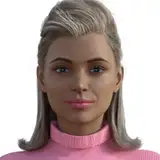
I wanna show you another great tool you can use a lot. This is Sponge Tool (under Dodge and Burn) I think it's good to use it as a final touch, when image is ready.
1. Select Sponge Tool, use the same brush I always use. Flow 8%, Mode - Saturate. And yes, you can add saturation where you need it! For example, add some color to her hair, lips, eyes. You can make makeup more colorful.
2. Mode- Desaturate, the same brush, the same settings. And now you can desaturate her skin where it became too red, for example.
Try, this tool is must have. RAW file included.
Sean Archer
2022-04-08 13:07:51 +0000 UTCFrank Martin
2022-04-08 12:02:21 +0000 UTC