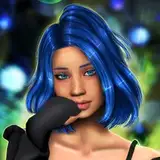
The Moods was made as a request by one of my lovely and very patient Patreon subscribers, Kay. Their brief was for a darker, moody, purple-toned preset that emphasised a wistful, dreamy look intended for screenshots rather than for gameplay.
After a lot of experimentation, I decided I couldn't just settle on one specific look, and set to work creating lots and lots of LUTs, each with a different atmospheric and moody feel. The result is 30 (yes, thirty!) custom LUTs (all made by me!) contained in one MultiLUT shader that can be switched between to set the perfect scene.
All the heavy lifting is done by the LUTs. The remaining shaders deal with anti-aliasing, sharpening, ambient occlusion and indirect lighting, bloom, distance fog, depth of field blur, and film grain. This means The Moods is a lightweight preset, relying on only one shader for all the colour information - everything else is bells and whistles stuff that you can enable or disable as you want. I definately recommend experimenting with those bells and whistles though!
Even though it is a lightweight preset, it's doubtful you'll want to use it during gameplay, and is perhaps one you'll prefer to switch to for screenshots instead. It's up to you though!
You can find an album with example shots, as well as some interior and exterior comparisons of all 30 LUTs here: https://imgur.com/a/gE0eVcq
---
INSTALLATION:
The Moods was made with ReShade 4.9.1 and requires shaders from the following shader packs (all of which are available to download when you install ReShade):
If you have ReShade and the above packs installed already, download the file included below, then open the folder called 'amoebae - The Moods ReShade Bin' and drop the reshade-shaders folder and amoe - The Moods.ini file into your Bin folder and say yes if asked to overwrite anything.
If you don't have ReShade installed already, you can download the current version here: https://reshade.me/ and when asked which packs you want to download select the ones listed above. Once you've finished the installation process, follow the instructions above for placing my included files into your Bin folder.
There are full and more in-depth instructions included in the file below, as well as a screenshot showing which packs to select during the ReShade installation process, as well as links to download them if you already have ReShade installed but not those specific packs. There is also a list of the exact shaders and textures from each pack you need, in case you want to delete any that you don't want or need.
Also included in the file below is a list of the shaders used in The Moods with the order they should appear in the ReShade menu, the hotkeys assigned to them, and a short explanation of what they do and how to use them.
If you need any more help, please get in touch preferably via my discord server https://discord.gg/CzbWRhG7UH, otherwise you can send me a message here or on tumblr.
---
With huge thanks to everyone involved in the ReShade project, and with special thanks to Kay for requesting this preset and for being so patient with me.
EDIT 2021-06-07: If anyone is having problems with either the game crashing when switching to The Moods, or with an error message regarding LUTs/MultiLUTs, remove MultiLUT.fx from your Shaders folder. It seems there may be an incompatibility between that and Prod's MultiLUT shader that I use here (and in Clear Pop). If this solves the crashing/error for you, please let me know.
amoebae
2021-06-26 15:03:16 +0000 UTCamoebae
2021-06-15 23:12:30 +0000 UTCamoebae
2021-06-02 09:54:16 +0000 UTCLuciana Keil
2021-06-02 09:15:55 +0000 UTC