Hello everyone!
And I have to apologize.😫 This week, I got addicted to the game Dragon Ball Breakers (like Dead by daylight) make much sprite work. Very sorry!😣It's dangerous, so I'll put this game away for a while.
Let's check the progress this week!

The issue I've been working on since last week has finally been resolved. You have complete control over the detection and identification of devices connected to your PC, the number of players, and the assignment of each player to a device!😍
Unity automatically pairs devices, but if you want to manually control this, you need to unpair once and then pair again the device that detects the input. In summary, press the button of the device you want to use, and it will automatically be fixed as the control device. It also supports 2 players, so local battles are possible!

With the above realized, you need to choose how many people you want to play with first. For that reason, I also prepared a title scene. Also, currently, the player device settings and operation logic are reset for each scene, but it seems better to unify the common logic throughout the game. This is still in progress. What I've learned is that there's a lot of rework when it comes to making things from scratch. The first thing we made was a single-player practice mode, so we had to do a major overhaul to expand it to this point.
To avoid making mistakes like mine, you should start with the overall design first.😥
Composer Tempxa-san has left the project due to busy schedules and financial reasons. I am sad, 😭but I thank him for his cooperation and wish him all the best in the future!✨
Like the current character select, we will use rights-free BGM for a while.
The final voice from Abi-san has arrived! Great job as always. We plan to implement these next week.
Also, the lines for Modeus' introduction movie have been decided this week. Modeus's personality is interpreted differently by different people, so it was harder than I imagined to decide. I have a meeting with the voice actor today, and the deadline for Modeus' in-game lines is up. We are planning to place our first order next week.
I replaced the SSD last week, but for some reason the slow operation did not improve. So I opened task manager and checked the load.

I've always only checked memory, but I've noticed that disk utilization is always at 50% without doing anything.

I checked the performance tab and the disk usage is 100%. This is abnormal!
Since it is a computer five years ago, the HDD may have already reached the end of its life. I checked the health status of the HDD using a tool called CrystalDiskInfo.

The results were dangerous. I'm not sure, but it looks like there are a lot of bad sectors in the disk that are slowing things down. In addition, data may be lost due to malfunction.😨I was satisfied with just replacing the SSD, but I was preparing to replace the HDD just in case, so I decided to do it.
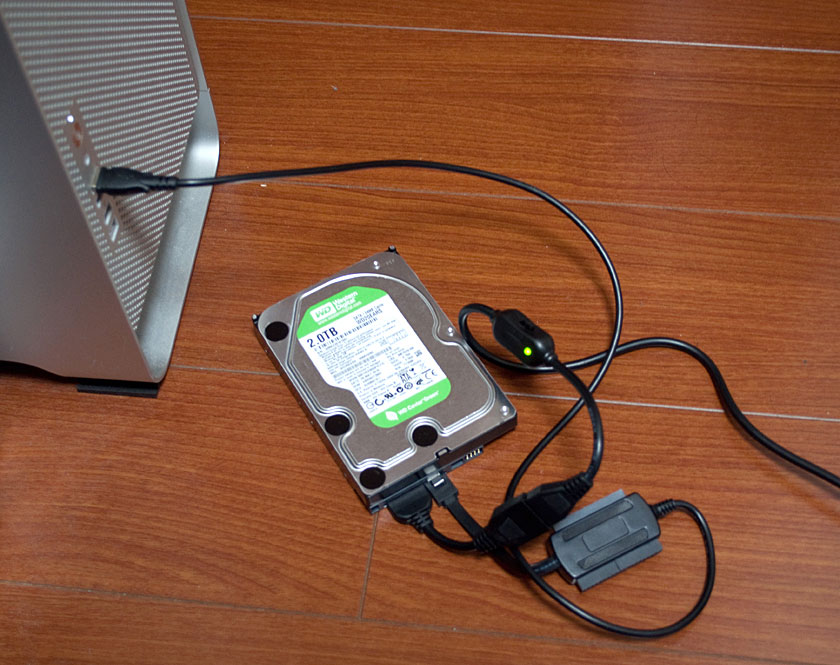
Connect the replacement internal HDD to the PC and start cloning. Unlike the image, I prepared an 8TB HDD this time. Since it is currently 2TB, the capacity will increase significantly. I used Macrium Reflect for the clone as last time, but it didn't work. Apparently, if there are many bad sectors, cloning will not work.
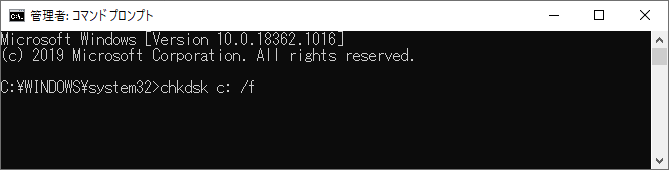
To solve this problem, run the CHKDSK command in Command Prompt. This command detects bad sectors and repairs readable information on the software side. I'm not sure, but it doesn't seem to fix the hard disk.
Next, clean format the new HDD because the clone failed and got corrupted data.

Run the CLEAN ALL command at the command prompt.
Since 8TB is a large capacity, it seems that it will take time. This process prevents the data from being used by others when the HDD is discarded, and a simple format may have been enough this time.
I tried cloning, but it didn't work either. Since the repair process is complete, I will try to change the software. Then I used AOMEI Backuper.

If it fails this time, it will take a long time to format again. Wait for the clone completion while praying.🙏

Finished safely! 🤩

Physically replace the HDD. I can't be relieved until I confirm that it starts up safely even if I come this far. HDD is not recognized when booting. Since the new HDD was F drive, change the drive assignment to D from Disk Management.
It started successfully!😍 The application also works fine so far. The system called Microsoft Windows Search Indexer is busy behind the scenes, probably because I swapped drives, but it's probably temporary.

HDD is in good condition. I was relieved. Actually, I was planning to have a meeting with the Scriptwriter and Modeus, but this work blew away that time.😰
It's fast and it looks like it's going to end again this year. Modeus won't make it in time for December to be honest.😓 I wants to implement a local match feature instead.
That's all today.
Have a nice day!
杏丙
2022-10-22 10:58:20 +0000 UTC杏丙
2022-10-22 10:55:41 +0000 UTCNick!
2022-10-22 06:40:23 +0000 UTCNekoSaibot
2022-10-22 05:26:07 +0000 UTC