NokiMo
dreamsavior
dreamsavior

patreon


Translator++ V.1.11.19 – #ThankYouPatrons

Hello fellow translators,
Precisely at this month Translator++ has been around for a year.

For each passing day, Translator++ is getting closer to the game translation tool in my vision.

And this is all thanks to your support.

Translator++ wouldn’t exist without you!

In this happy moment I also want to announce the new release of Translator++

Translator++ ver. 1.11.19 :

In this update I focus a lot on user experience when doing manual translation and editing, such as :

Current Cell’s Editor’s font has been changed to monospace.

Half-width characters will exactly take half the space of full-width characters.
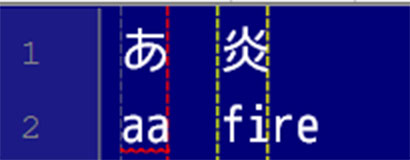
 Font width comparison between full-width (ie. Kanji, hiragana, Chinese Hanzi) and half-width (alphanumeric) characters. 


This change is mandatory for the following feature:

Markings and guides

This is a nice addition to provide visual aid so the translator can know that the translation results will overflow in the in-game dialog box or not.

 You can add and customize one or more markers. 


More control for Original Text’s window

Now you can resize the font on the Original Text’s window.


I changed the order of Japanese text rendering and related romaji. In the latest version, we can now select romaji characters or Japanese characters per line correctly. This cannot be done in the previous version.
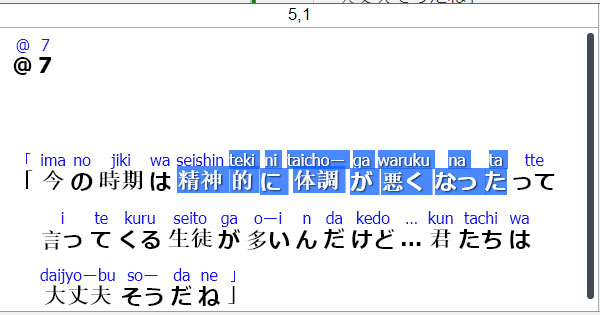
 In the previous version, you can not select only the Japanese letter. 
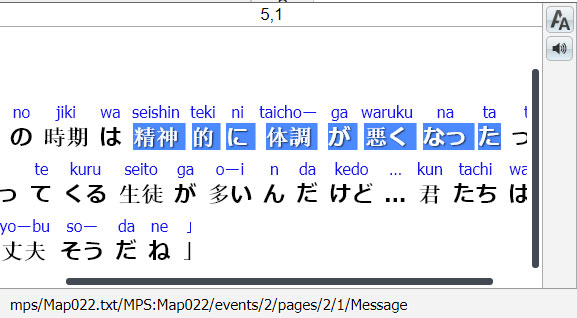

 The behavior of selection has been corrected in the Ver. 1.11.19 


Did you notice the audio button at the Original Text’s window’s toolbar?

Text to Speech has been implemented

I find it easier to understand spoken Japanese than written. So I always wanted to have a feature to help me read the text in the Original Text window out loud. If you’re like me, you will be greatly helped by this Text to Speech feature.

Maybe this feature doesn’t support all languages. And it might also required to install the destination language pack on Windows in order to use certain languages. Please check it out!

You can download Translator++ Ver. 1.11.19 at the patron’s download section.

Public Release

Translator++ Ver. 1.11.6 is available for everyone.

Happy Translating!

Translator++ V.1.11.19 – #ThankYouPatrons

Comments

tried translate a game made with Wolf. Saw the guide in YT, but doesnt work. There arent any data.wolf; replaced the data folder the game works, but can translate/edit in translator++

matth

hello . good day . i'm getting this error Error opening file : undefined TypeError [ERR_INVALID_ARG_TYPE]: The "path" argument must be one of type string, Buffer, or URL. Received type undefined

amhz007

I'm little bit confused here. Translator++ has been supported Wolf RPG since last year.

Dreamsavior

Hello Autonomous Spaghetti, Thank you for your great feedback. For long message, I think It's better that you mail me directly or use private messaging in Patreon. I will definitely write down your feedback on my to-do list. And you will see some of them in the next update. Stay tuned, and cheers.

Dreamsavior

Consistency issues: -Some important buttons don't have the same behavior in the white and blue boxes when editing text. This causes issues with my muscle memory when I want to do a quick edit in one or the other box and keep accidentally saving the changes instead of making a new line, or vice versa. White box: -ENTER saves changes and moves selection down -SHIFT + ENTER saves changes and moves selection up -CTRL + ENTER makes a new line -NUMPAD ENTER behaves like regular enter: ctrl + numpad enter makes a new line, etc -When you save changes in the white box, extra whitespace before and after the text is pruned Blue box: -ENTER finishes the word you're writing using the suggested one -SHIFT + ENTER makes a new line -CTRL + ENTER does nothing -NUMPAD ENTER always saves changes (and finishes the word you're writing), whether or not you're pressing shift or ctrl. -When you save changes in the blue box, whitespace before and after the text is kept I would recommend making the behavior consistent across both ways of editing text. I use numpad enter especially often because it's the closest one to my mouse hand, and it's kind of weird that I can only linebreak with it when I'm editing inside the white box. Oh, and being able to keep extra whitespace is a good feature which I hope you won't remove. For example, in RPGMaker VX when there are multiple enemies with the same name, the game appends a letter after the enemy name (EnemyA, EnemyB, EnemyC etc). This can't really be changed, so the only way to have a space between the name and the letter is to leave a space after the enemy names. Finally, enter finishing the autosuggest word in the blue box is kind of annoying behavior? I want line breaks much more than I want the word "your" autofinished to "yourself". Pretty much every text editor has enter line break, and autofinishing suggestion is done with either tab, shift+enter, or arrow keys to first select and enter to confirm.

autonomous spaghetti

Apparently Patreon's spam filter sometimes eats long comments. That's fucked up. I'll try to post this in two parts then: I've been using 1.11.19 for a few days now and I've got some feedback. There's a bug, some consistency issues in behavior, and a usability issue. If it matters for debugging, I'm still working on an RPGMaker VX game. I'll be calling the translation fields in the main screen the "white box", and the current cell editor the "blue box" for short. Bug: -When you're editing the white box, if you move to a different file using the search function the text gets saved in that file instead. For example, if I'm editing entry #2 in actors.txt and then decide to search for something and go to armors.txt, the text in the entry I was editing would replace whatever is in entry #2 in armors.txt. This doesn't happen when editing the blue box. -(I also had a weird issue where after I restarted Translator++ the line markers were at the wrong places. I've got a pink marker at 44, a red at 50, and a blue at 61. When I restarted the blue was nowhere and the red and pink markers had moved forwards (probably to 55 and 61?), but they fixed themselves when I checked my marker settings. I haven't been able to replicate this.)

autonomous spaghetti

I'm pretty sure I posted some feedback for this version, but now I can't find it. Did it vanish somewhere or did I accidentally reply to some other post? Weird.

autonomous spaghetti

Any chance this version works with RPG Wolf?

Ah, I'm sorry. Fixed now.

Dreamsavior

Hello, and thank you for the release. The horizontal markers should save me a looooot of work. But just as a heads up, you forgot to change the patron download link from 1.11.6 to 1.11.19 :)

autonomous spaghetti


Related Creators